
Vous hésitez entre un clavier 60% et un clavier mécanique 65% ? Ce guide détaillé compare les claviers 60% et 65% en détaillant leurs caractéristiques : format compact, technologie des commutateurs magnétiques et trois claviers à effet Hall populaires, afin de vous aider à faire le bon choix.
Pourquoi les claviers compacts vont dominer le marché en 2026
Pénétrez aujourd'hui dans n'importe quelle arène d'e-sport, studio de créateur de contenu ou espace de travail minimaliste, et vous constaterez une tendance claire : l'ère des claviers encombrants de taille standard est en train de disparaître. Ces deux dernières années, le marché des claviers mécaniques a connu une forte croissance grâce aux formats compacts, notamment les modèles 60% et 65%, et cette tendance ne semble pas près de s'essouffler.
Mais qu'est-ce qui motive ce changement ?
- Exigences du secteur de l'e-sport : Les joueurs de FPS dans des titres comme Valorant, CS2, et Apex Legends J'ai besoin d'un maximum d'espace sur le bureau pour effectuer des mouvements de souris amples et rapides avec des paramètres DPI faibles.
- Esthétique du bureau : Les configurations minimalistes sont omniprésentes sur les réseaux sociaux, et un clavier plus petit permet instantanément de désencombrer votre espace de travail.
- Portabilité: Les étudiants, les nomades numériques et les travailleurs hybrides veulent un clavier qu'ils puissent glisser dans un sac à dos sans sacrifier la qualité.
Une question cruciale demeure toutefois pour les acheteurs qui s'intéressent à 60% clavier clavier vs 65%Quelle est la différence concrète, et lequel vous convient le mieux ?
Ce guide vous expliquera comment procéder :
- Principes fondamentaux de la disposition du clavier (de taille standard à 40%)
- Comment fonctionnent les commutateurs magnétiques à effet Hall — et pourquoi ils changent la donne
- Trois claviers à effet Hall haut de gamme passés en revue en détail
- Une comparaison côte à côte
- Un cadre de décision d'achat clair
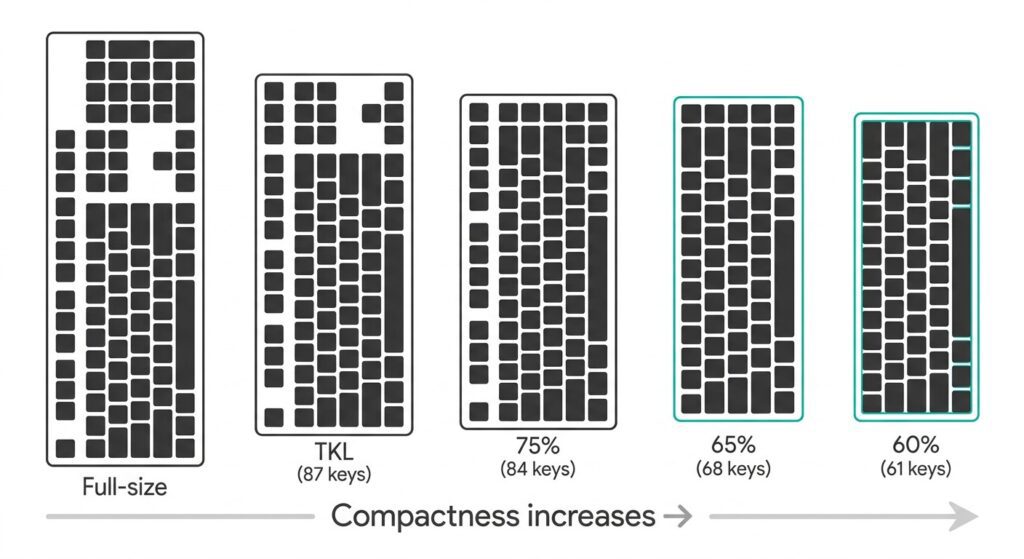
Partie 1 : Principes de base de la disposition des claviers — Du format standard au format compact
Qu'est-ce qu'une disposition de clavier ? La disposition (ou format) d'un clavier fait référence au nombre de touches, à leur agencement et à l'encombrement global du clavier. Plus la disposition est compacte, moins il y a de touches, et plus on dépend des combinaisons de touches (avec la touche Fn) pour accéder aux fonctions manquantes.
Aperçu des mises en page courantes
| Mise en page | Nombre de clés | Caractéristiques principales | Idéal pour |
|---|---|---|---|
| Taille réelle | 104/108 | Rangée de touches F complète, flèches directionnelles, pavé numérique | Comptables, saisie de données, saisie de gros volumes de chiffres |
| TKL (sans pavé numérique) | 87 | Rangée de touches F + flèches directionnelles, pas de pavé numérique | Les utilisateurs qui ont besoin des touches fléchées/Flash mais qui souhaitent gagner de la place |
| 75% | ~84 | Flèches + touches de fonction condensées | Fonctionnalités équilibrées dans un format compact |
| 65% | ~68 | Flèches dédiées + quelques touches de navigation | Utilisateurs qui utilisent les touches fléchées mais souhaitent un format compact |
| 60% | ~61 | Groupe principal uniquement — flèches/ligne F via Fn | Les minimalistes à l'aise avec les combinaisons de touches |
| 40% | ~40 | Lettres seulement — tout le reste via des calques | Passionnés et programmeurs invétérés |
Clavier 60% Clavier vs 65% : Explication de la différence fondamentale
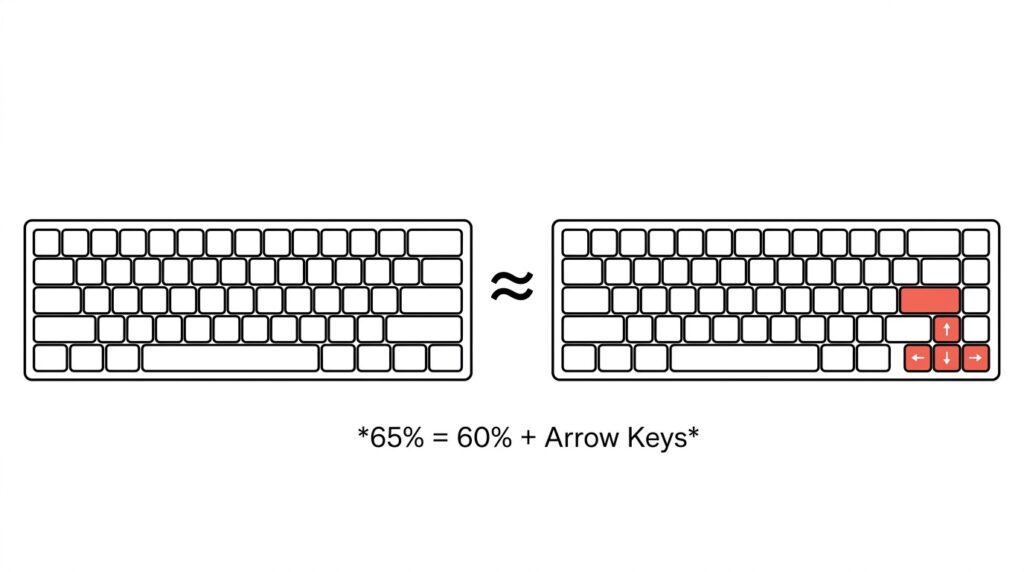
Voici la façon la plus simple de le comprendre : 65% ≈ 60% + touches fléchées dédiées
- Disposition 60% (61 touches) : Ce clavier réduit un clavier standard en supprimant le pavé numérique, la rangée de touches F, le pavé de navigation et les touches fléchées. Tout ce qui se trouve au-delà du bloc alphanumérique est accessible via des combinaisons de touches Fn.
- Disposition 65% (68 touches) : Il s'appuie sur le 60% en ajoutant des touches fléchées dédiées ainsi qu'une petite colonne de touches de navigation (généralement Suppr, Page précédente, Page suivante).
Il ne s'agit pas de savoir “ lequel est le meilleur ”, mais plutôt “ lequel correspond le mieux à votre flux de travail ”. Le 65% facilite la prise en main, tandis que le 60% offre une compacité maximale.
Partie 2 : Les commutateurs à effet Hall — La technologie qui révolutionne les claviers d’e-sport
Comment fonctionnent les interrupteurs mécaniques traditionnels ? Les commutateurs mécaniques traditionnels utilisent des contacts métalliques physiques pour enregistrer une frappe au clavier :
- Vous appuyez sur une touche
- Deux feuilles métalliques entrent en contact
- Le circuit se ferme et la frappe au clavier est enregistrée.
Cela fonctionne, mais présente des limites : points d’actionnement fixes, usure progressive des contacts, oxydation au fil du temps et impossibilité de régler avec précision le comportement de la clé.
Fonctionnement des interrupteurs à effet Hall (magnétiques) Les interrupteurs à effet Hall remplacent les contacts métalliques par un aimant et un capteur à effet Hall :
- Un aimant est placé sous chaque touche.
- Lorsque vous appuyez, l'aimant se rapproche du capteur.
- Le capteur détecte la variation de l'intensité du champ magnétique et la convertit en un signal de tension.
- Le signal déclenche la frappe au clavier
Comme aucun contact physique n'est requis pour l'actionnement, les interrupteurs magnétiques sont pratiquement sans usure et offrent quelque chose que les interrupteurs traditionnels ne peuvent tout simplement pas faire : des points d'actionnement entièrement réglables.
Effet Hall vs Mécanique : Comparaison côte à côte
| Fonctionnalité | Mécanique traditionnelle | Clavier à effet Hall |
|---|---|---|
| Méthode d'actionnement | contact physique avec le métal | Détection de champ magnétique (sans contact) |
| Point d'actionnement | Fixé | Entièrement réglable (par exemple, 0,001–3,3 mm) |
| vitesse de réponse | Limité par les déplacements physiques | Ultra-rapide (latence aussi faible que 0,08 ms) |
| Durée de vie | Limité par les vêtements de contact | Nettement plus long (sans port de lentilles) |
| Déclenchement rapide | Non pris en charge | Entièrement pris en charge |
Qu'est-ce que le déclenchement rapide (RT) et pourquoi est-il important pour les jeux FPS ? Le déclenchement rapide est sans doute l'atout majeur des interrupteurs magnétiques.
Sur un clavier traditionnel, après avoir appuyé sur une touche, celle-ci doit remonter au-delà d'un point de réinitialisation fixe avant de pouvoir être enregistrée à nouveau. Cela crée un délai, certes faible, mais catastrophique dans les jeux FPS compétitifs.
Avec Rapid Trigger, vous définissez dynamiquement les points d'activation et de réinitialisation. Dès que vous relâchez la touche, elle se réinitialise. Cela signifie :
- Contre-strafe plus rapide dans Valorant et CS2
- Changements de direction plus rapides
- Temps de réponse inférieur à la milliseconde aux entrées
Les trois claviers présentés ci-dessous prennent en charge la fonction Rapid Trigger avec une précision de 0,001 mm.
Partie 3 : Clavier à effet Hall Three Top — Testé
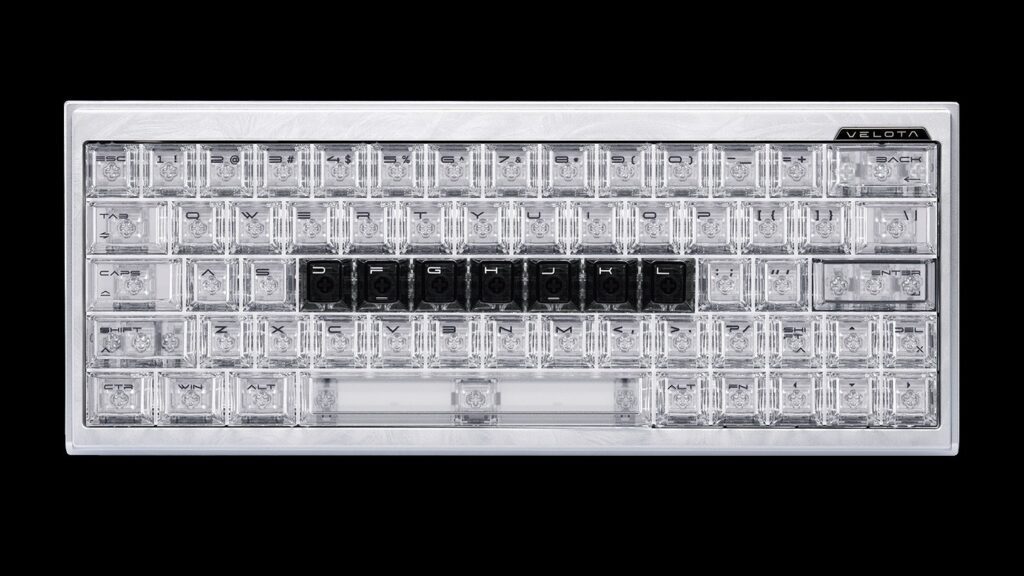
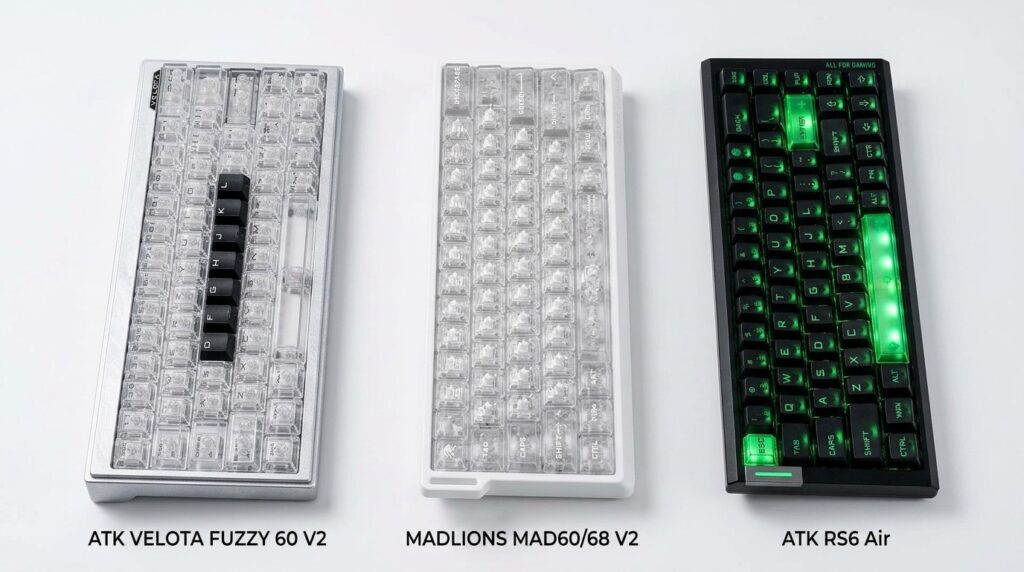
ATK Velota Fuzzy 60 V2 — Le fleuron de la performance 60%
- Mise en page: 60% (61 touches)
- Position: Modèle haut de gamme pour les passionnés de performance et de savoir-faire
- Points clés :
- Architecture Tri-Core Frame-Sync™ : Première mondiale : conception à triple microcontrôleur, répartissant les calculs sur trois microcontrôleurs haute fréquence pour un traitement du signal inégalé.
- Interrupteur magnétique RAPTOR + Technologie Hall intelligente MagNeural™ : Intègre un cœur de calcul indépendant au sein même du capteur à effet Hall, permettant une compensation du signal en temps réel.
- Fréquence d'interrogation de 8 kHz avec une latence de transmission extrêmement faible.
- Précision de déclenchement rapide réglable à 0,001 mm.
- Construction haut de gamme : Châssis usiné CNC avec finition argentée anodisée 220 mesh, texturage en relief TROPIX et base en plastique PA12 (flux magnétique 600 GS). Course totale : 3,2 ± 0,1 mm.
- Pourquoi elle représente la catégorie 60% : Elle pousse la philosophie “ extrême ” du format 60% dans tous les aspects : performances, matériaux et esthétique.
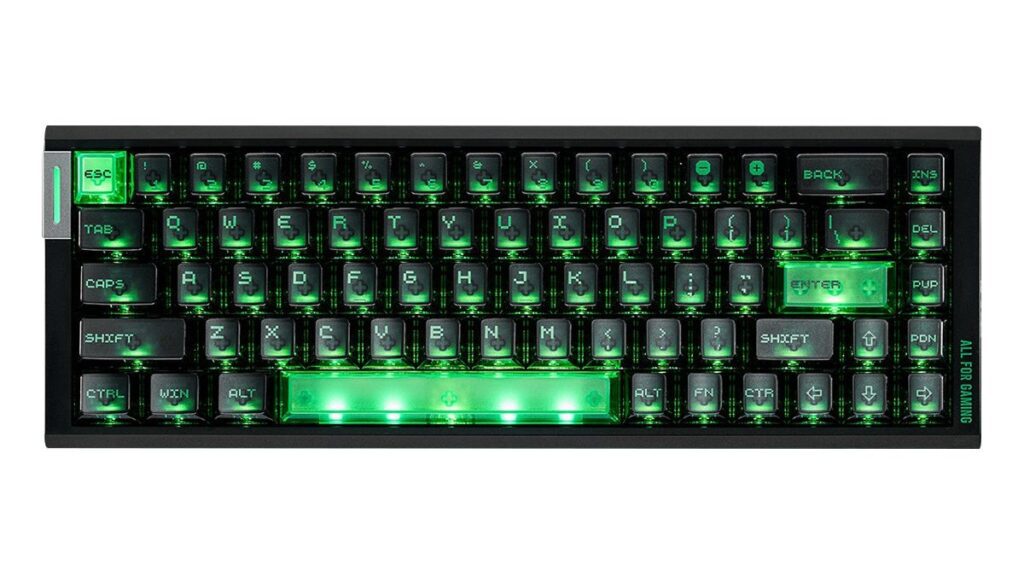
ATK RS6 Air — Le 65% polyvalent
- Mise en page: 65% (68 touches)
- Position: Le choix idéal pour les utilisateurs qui recherchent un format compact et des fonctionnalités complètes
- Points clés :
- Interrupteurs magnétiques LIEFENG ULTRA de 3e génération.
- Fréquence d'interrogation de 8 kHz + Fréquence de balayage de 32 kHz en mode complet + Fréquence de balayage de 256 kHz en mode simple.
- Latence de transmission de 0,08 ms, latence de bout en bout de 0,28 ms.
- Réglage de l'actionnement sur toute la plage de 0,001 à 3,3 mm — Définir des valeurs personnalisées pour WASD et les touches de fonction.
- Des images saisissantes : Touches de clavier PC mates, bandes latérales RGB “ Mech Wing ”, logo en forme de lame lumineuse, plaque nominative en métal gravée au laser et barre d'espace à 5 LED.
- Options de commutation : Commutateurs ATK Qianyuan ou Bingren.
- Pourquoi elle représente la catégorie 65% : Elle conserve la commodité des touches fléchées dédiées tout en poussant chaque spécification de performance à son maximum — le choix par excellence “ compact mais sans compromis ”.
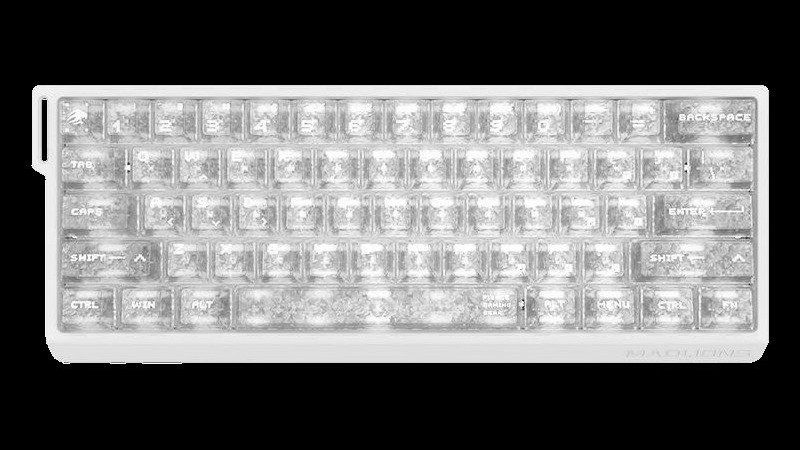
MADLIONS MAD60/68 V2 — Une série, deux mises en page
- Mise en page: Disponible en versions 60% (61 touches) et 65% (68 touches).
- Position: Clavier magnétique facile à utiliser et accessible pour les utilisateurs qui recherchent la flexibilité
- Points clés :
- Interrupteurs magnétiques à effet Hall avec prise en charge complète du déclenchement rapide.
- Pilote basé sur le Web : Aucune installation de logiciel requise — configurez le mappage des touches, les paramètres RT, les taux d'interrogation et plus encore directement dans votre navigateur.
- Construction solide : “Boîtier en forme de coque de bateau, touches PBT avec impression par sublimation thermique et format compact optimisé.
- Pourquoi il représente le concept de double disposition : Elle permet aux utilisateurs de comparer directement l'expérience des modèles 60% et 65% au sein d'une même gamme de produits, tout en prouvant que la technologie des commutateurs magnétiques a désormais atteint tous les segments du marché, de l'entrée de gamme au fleuron.
Partie 4 : Comparaison multidimensionnelle
Comparaison des fiches techniques
| Fonctionnalité | Velota Fuzzy 60 V2 | RS6 Air | MAD60/68 V2 |
|---|---|---|---|
| Mise en page | 60% | 65% (68 touches) | 60% / 65% (sélectionnable) |
| Taux de participation | 8 kHz | 8 kHz | 8 kHz |
| latence de transmission | Ultra-bas | 0,08 ms | — |
| Latence de bout en bout | — | 0,28 ms | — |
| Précision du déclencheur rapide | 0,001 mm | 0,001 mm | Soutenu |
| Réglage de l'actionnement | Soutenu | 0,001–3,3 mm | Soutenu |
| Vitesse de numérisation | Synchronisation d'images Tri-Core | 32 kHz (touche complète) / 256 kHz (touche unique) | — |
| Type de commutateur | RAPTOR magnétique | LIEFENG ULTRA Génération 3 | Magnétique standard |
| Conducteur | ATK HUB | ATK HUB 3.0 | Basé sur le Web |
| Position | fleuron de la performance | Un appareil polyvalent et complet | Niveau d'entrée flexible |
60% Clavier Comparaison des cas d'utilisation du clavier 65% et du clavier 65%
| Scénario | 60% Victoires | 65% Victoires |
|---|---|---|
| Jeux FPS (utilisation rare des touches fléchées) | √ | — |
| MOBA/RPG (touches fléchées fréquentes) | — | √ |
| Espace de bureau extrêmement limité | √ | — |
| Je ne veux pas apprendre les combinaisons de touches. | — | √ |
| esthétique minimaliste maximale | √ | — |
| Utilisation mixte pour le travail et les jeux | — | √ |
Partie 5 : Guide d'achat — Lequel choisir ?
Choisissez un 60% si vous…
- Espace de travail très limité (chambres d'étudiants, postes de travail exigus).
- Sont disposés à apprendre et à s'adapter aux combinaisons clés
- Vous souhaitez un bureau au look le plus minimaliste possible ?
- Je joue principalement à des jeux de tir à la première personne où les touches fléchées ne sont pas essentielles.
Choisissez un 65% si vous…
- Impossible de me passer de touches fléchées dédiées
- Je ne veux pas appuyer constamment sur des combinaisons de touches Fn.
- Jouez à des MOBA, des RPG ou des jeux de stratégie utilisant les touches fléchées.
- Vous utilisez votre clavier pour le travail et les jeux et vous souhaitez une prise en main rapide.
L'arbre de décision à une question “ Puis-je me passer de touches fléchées dédiées ? ”
- Oui → Go 60% → Velota Fuzzy 60 V2 ou MAD60 V2
- Non → Go 65% → RS6 Air ou MAD68 V2
- Pas sûr → Essayez MADLIONS MAD60/68 V2 — elle existe dans les deux formats au sein de la même série
Choisissez en fonction de vos priorités.
- Performances et fabrication de haut niveau → ATK Velota Fuzzy 60 V2 (Architecture Tri-Core + conception haut de gamme)
- Touches fléchées + toutes les spécifications de performance au maximum → ATK RS6 Air (65% + 8KHz + suite de réglage complète)
- Simplicité plug-and-play et flexibilité d'agencement → MADLIONS MAD60/68 V2 (pilote web + option double disposition)
Conclusion : L'avenir est compact et repose sur l'effet Hall.
Au moment de choisir entre 60% Clavier clavier vs 65%, Il n'y a pas de choix objectivement “ meilleur ” — toute la décision se résume à une seule question : avez-vous besoin de touches fléchées dédiées ?
Une fois que vous aurez répondu à cette question, votre mise en page sera décidée.
Si l'on considère la situation dans son ensemble, deux tendances claires redessinent le paysage de l'industrie du clavier :
- Les interrupteurs magnétiques à effet Hall se généralisent. Du modèle phare Velota Fuzzy 60 V2 au modèle accessible MAD60/68 V2, la technologie des commutateurs magnétiques couvre désormais toutes les gammes de prix, prouvant qu'il ne s'agit plus d'une caractéristique de luxe, mais de la nouvelle norme pour le jeu compétitif.
- La combinaison compacte et magnétique devient la norme pour les FPS. Cette combinaison offre le meilleur équilibre entre espace pour la souris, vitesse de réponse et possibilités de réglage — et elle devient rapidement la configuration par défaut des joueurs de FPS sérieux.
Si vous hésitez encore à 60% Clavier clavier vs 65%, Posez-vous simplement la question suivante : “ Puis-je utiliser confortablement des combinaisons de touches pour les touches fléchées ? ” La réponse se trouve dans la configuration de votre clavier.
Quelle que soit la direction que vous choisissiez, une chose est sûre : vous entrez dans la prochaine génération de technologies de clavier.

 English
  German
  Portuguese
  Spanish
  Italian
  Finnish
  French
  Japanese
  Korean
  Swedish