
60%キーボードと65%メカニカルキーボードのどちらを選ぶか迷っていますか?この詳細ガイドでは、60%キーボードと65%キーボードを比較する際に役立つよう、コンパクトなレイアウト、磁気スイッチ技術、そして人気のホール効果キーボード3機種をレビューしています。.
2026年にコンパクトキーボードが主流になる理由
今日、eスポーツアリーナ、コンテンツクリエイターの作業スペース、あるいはミニマルなデスクの展示スペースに足を踏み入れると、ある明確な傾向に気づくでしょう。それは、かさばるフルサイズキーボードの時代が急速に終焉を迎えつつあるということです。過去2年間で、メカニカルキーボード市場では、特に60%キーボードと65%キーボードといったコンパクトなレイアウトの製品が爆発的に増加しており、その勢いは衰える気配がありません。.
しかし、この変化の原動力は何なのだろうか?
- eスポーツが求めるもの: FPSプレイヤーは次のようなタイトルでプレイします ヴァロラント, CS2, 、 そして Apex Legends 低DPI設定でマウスを大きく動かすには、デスク上のスペースを最大限に確保する必要があります。.
- デスクの美観: ミニマルなレイアウトはソーシャルメディアでよく見かけるが、小型キーボードを使えば作業スペースが瞬時にすっきりする。.
- 携帯性: 学生、デジタルノマド、ハイブリッドワーカーは、品質を損なうことなくバックパックに放り込めるキーボードを求めている。.
しかし、購入を検討している人にとって重要な疑問が残ります。 60% キーボード vs 65%キーボード実際の違いは何ですか?そして、どちらがあなたに合っていますか?
このガイドでは、以下の手順を説明します。
- キーボードレイアウトの基本(フルサイズから40%まで)
- ホール効果磁気スイッチの仕組みと、それが画期的な技術である理由
- トップクラスのホール効果キーボード3機種を詳細にレビュー
- 並べて比較する
- 明確な購買決定フレームワーク
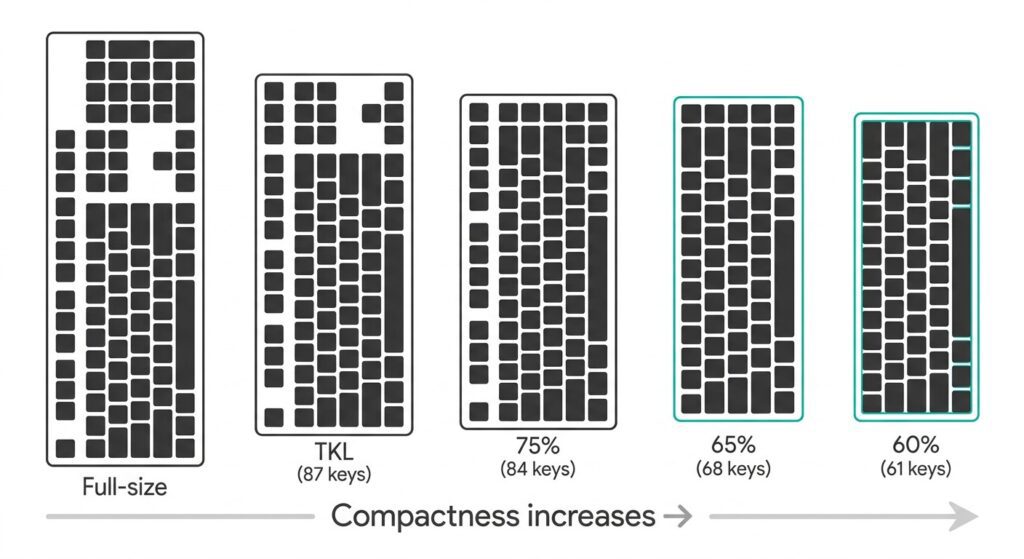
パート1:キーボードレイアウトの基本 ― フルサイズからコンパクトまで
キーボードレイアウトとは何ですか? キーボードの「レイアウト」(または「フォームファクター」)とは、キーの数、配置、およびキーボード全体のサイズを指します。レイアウトが小さくなるほど、削除されるキーの数が増え、不足している機能にアクセスするためにキーの組み合わせ(Fn修飾キーを使用)に頼る必要性が高まります。.
一般的なレイアウトの概要
| レイアウト | キー数 | 主な機能 | 最適な用途 |
|---|---|---|---|
| フルサイズ | 104/108 | Fキー列、矢印キー、テンキーをすべて使用 | 会計士、データ入力、大量の数値入力 |
| TKL(テンキーレス) | 87 | F列+矢印キー、テンキーなし | 矢印キーやファンクションキーが必要だが、スペースを節約したいユーザー向け |
| 75% | ~84 | 矢印キーとコンパクト化されたファンクションキー | コンパクトなサイズながら、バランスの取れた機能性を実現。 |
| 65% | ~68 | 専用の矢印キーといくつかのナビゲーションキー | 矢印キーを多用するが、コンパクトなサイズを求めるユーザー |
| 60% | ~61 | メインクラスターのみ — Fnキーで矢印/F行を表示 | キーの組み合わせに抵抗のないミニマリスト |
| 40% | ~40 | 文字のみ — その他はすべてレイヤーで処理 | 熱狂的な愛好家とプログラマー |
60%キーボード vs 65%キーボード:根本的な違いを解説
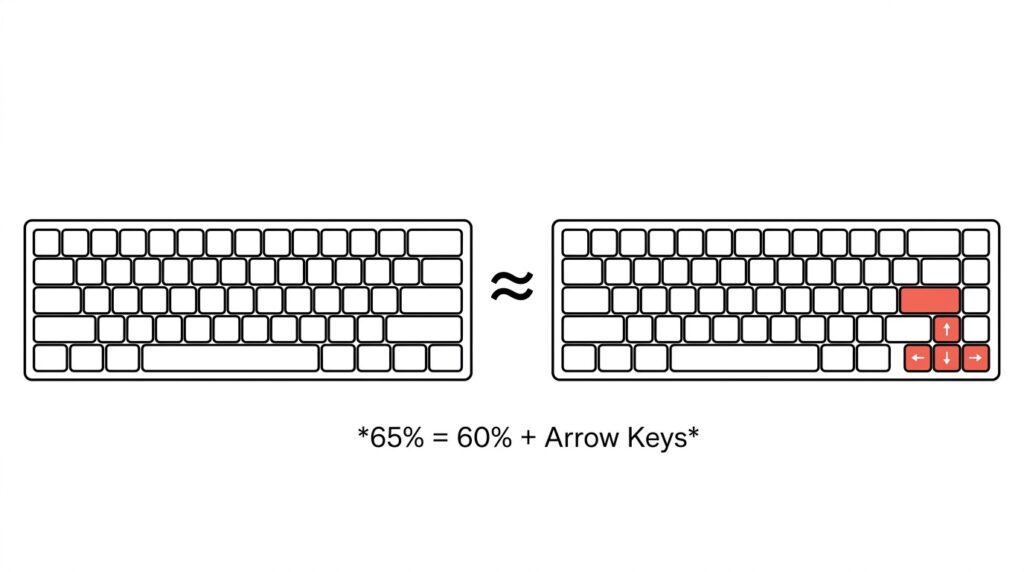
最も簡単な理解方法は以下のとおりです。 65% ≈ 60% + 専用矢印キー
- 60%レイアウト(61キー): フルサイズのキーボードからテンキー、ファンクションキー列、ナビゲーションキー群、矢印キーを取り除き、機能を簡素化したキーボードです。英数字キー以外のすべてのキーは、Fnキーの組み合わせで操作します。.
- 65%レイアウト(68キー): 60%をベースに、専用の矢印キーと、ナビゲーションキー(通常はDelete、Page Up、Page Down)の小さな列を追加した。.
これは「どちらが優れているか」という問題ではなく、「どちらがあなたのワークフローに合っているか」という問題です。65%は習得のしやすさを重視しており、60%はコンパクトさを極限まで追求しています。.
パート2:ホール効果スイッチ ― eスポーツキーボードを変革するテクノロジー
従来の機械式スイッチの仕組み 従来の機械式スイッチは、物理的な金属接点を利用してキーストロークを認識する。
- キーを押す
- 2枚の金属板が接触する
- 回路が閉じ、キー入力が記録される。
これは機能するものの、限界もある。作動点が固定されていること、接触面が徐々に摩耗すること、時間の経過とともに酸化すること、そしてキーの動作を微調整する方法がないことだ。.
ホール効果(磁気)スイッチの仕組み ホール効果スイッチは、金属接点を磁石とホールセンサーに置き換えたものです。
- 各キーキャップの下には磁石が埋め込まれている。
- 押し下げると、磁石がセンサーに近づきます。
- センサーは磁場強度の変化を検知し、それを電圧信号に変換する。
- 信号がキーストロークをトリガーする
作動に物理的な接触を必要としないため、磁気スイッチは事実上摩耗がなく、従来のスイッチでは実現できない利点、つまり完全に調整可能な作動点を提供します。.
ホール効果と機械式:比較
| 特徴 | 伝統的な機械 | ホール効果キーボード |
|---|---|---|
| 作動方法 | 物理的な金属接触 | 磁場検知(非接触式) |
| 作動点 | 修理済み | 完全に調整可能(例:0.001~3.3mm) |
| 応答速度 | 物理的な移動に制限される | 超高速(レイテンシは0.08msまで) |
| 寿命 | コンタクトレンズの着用に制限がある | 大幅に長い(コンタクトレンズ不要) |
| ラピッドトリガー | サポートされていません | 完全サポート |
ラピッドトリガー(RT)とは何か、そしてFPSゲームにとってなぜ重要なのか ラピッドトリガーは、磁気スイッチの最大の特長と言えるだろう。.
従来のキーボードでは、キーを押した後、キーが固定されたリセットポイントを越えて元の位置に戻るまで、入力が認識されません。このため、わずかな遅延が生じますが、FPS(ファーストパーソン・シューティング)のような競技性の高いゲームでは致命的な影響を与えます。.
Rapid Triggerでは、作動点とリセット点の両方を動的に定義できます。キーを離し始めた瞬間にリセットされます。つまり、次のようになります。
- より速いカウンターストレイフで ヴァロラント そして CS2
- より素早い方向転換
- 入力に対するサブミリ秒単位の応答性
以下でレビューする3つのキーボードはすべて、0.001mmの精度でラピッドトリガーに対応しています。.
パート3:トップクラスのホール効果キーボード3機種のレビュー
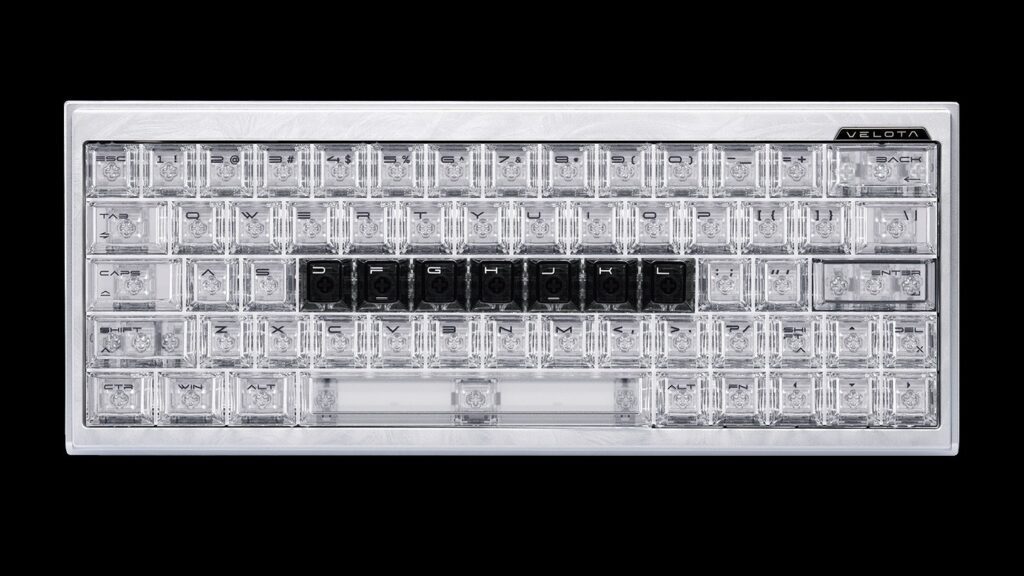
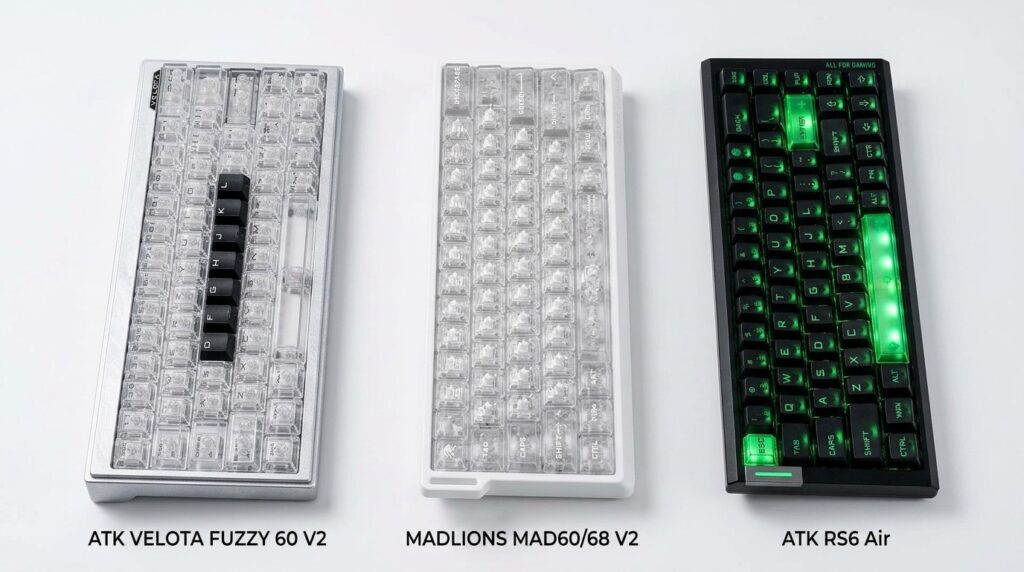
ATK ベロタ ファジー 60 V2 — 60% パフォーマンスフラッグシップ
- レイアウト: 60%(61キー)
- 位置: 性能と職人技を追求する愛好家のためのハイエンドフラッグシップモデル
- 主な特長:
- トライコア・フレームシンク™アーキテクチャ: 世界初のトリプルMCU設計。3つの高周波MCUに演算処理を分散させることで、比類のない信号処理性能を実現します。.
- RAPTOR磁気スイッチ+MagNeural™スマートホールテクノロジー: ホールセンサー自体に独立した演算コアを統合することで、リアルタイムでの信号補正を可能にする。.
- 8KHzのポーリングレート 極めて低い伝送遅延を実現。.
- 0.001mm調整可能な高速トリガー精度。.
- プレミアムな構造: CNC加工シャーシ、220メッシュ陽極酸化シルバー仕上げ、TROPIX波状レリーフテクスチャ、PA12プラスチックベース(磁束密度600GS)。総ストローク:3.2±0.1mm。.
- なぜこれが60%カテゴリーに属するのか: 60%のフォームファクターが持つ「極限」の哲学を、性能、素材、美観といったあらゆる側面にまで押し広げている。.
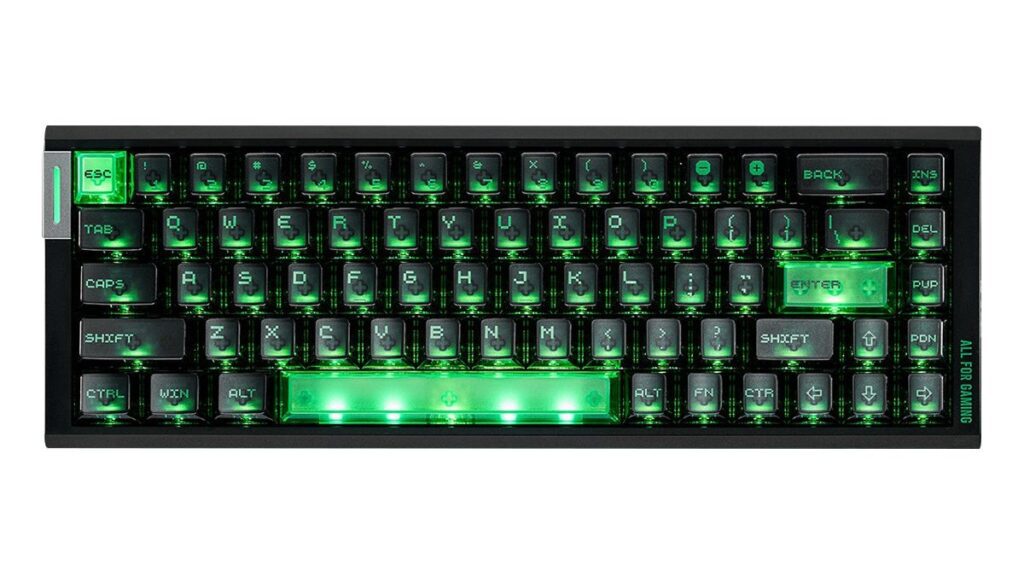
ATK RS6 エア — 65% オールラウンダー
- レイアウト: 65%(68キー)
- 位置: コンパクトなサイズと充実した機能を求めるユーザーにとって、バランスの取れた選択肢です。
- 主な特長:
- 第3世代LIEFENG ULTRA磁気スイッチ。.
- 8KHzのポーリングレート + 32kHzのフルキースキャンレート + 256kHzのシングルキースキャンレート。.
- 0.08msの伝送遅延, エンドツーエンドのレイテンシは0.28msです。.
- 0.001~3.3mmの全範囲アクチュエーション調整 — WASDキーとアビリティキーにそれぞれカスタム値を設定します。.
- 印象的なビジュアル: マット仕上げのPCキーキャップ、側面の「Mech Wing」RGBストリップ、ライトブレードロゴ、レーザー刻印された金属製ネームプレート、そして5つのLEDを搭載したスペースバー。.
- 切り替えオプション: ATK Qianyuan または Bingren スイッチ。.
- なぜこれが65%カテゴリーに属するのか: 専用の矢印キーによる利便性を維持しつつ、あらゆる性能仕様を限界まで高めた、まさに「コンパクトながら妥協なし」の決定版と言えるでしょう。.
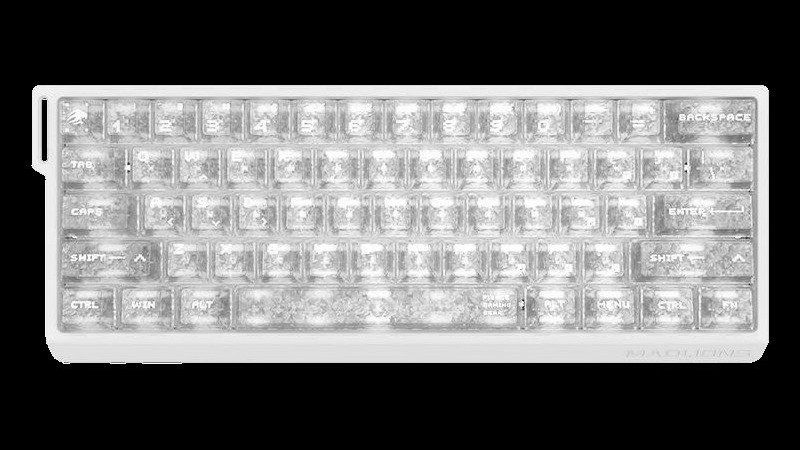
マドライオンズ MAD60/68 V2 — 1つのシリーズ、2つのレイアウト
- レイアウト: 60%(61キー)と65%(68キー)の2種類をご用意しています。
- 位置: 柔軟性を求めるユーザーのための、使いやすくアクセスしやすいマグネット式キーボード
- 主な特長:
- ホール効果磁気スイッチ ラピッドトリガーに完全対応。.
- ウェブベースのドライバー: ソフトウェアのインストールは不要です。キーマッピング、リアルタイム設定、ポーリングレートなどをブラウザ上で直接設定できます。.
- しっかりとした造り: “「船体」を模したケース構造、昇華印刷を施したPBTキーキャップ、そして緻密に設計されたコンパクトな形状。.
- なぜそれがデュアルレイアウトのコンセプトを体現しているのか: これにより、ユーザーは同じ製品ファミリー内で60%と65%の使用感を直接比較できるだけでなく、磁気スイッチ技術がエントリーモデルからフラッグシップモデルまで、あらゆる市場階層に普及していることを証明できます。.
第4部:多次元比較
仕様書比較
| 特徴 | ベロタ ファジー 60 V2 | RS6エア | MAD60/68 V2 |
|---|---|---|---|
| レイアウト | 60% | 65%(68キー) | 60% / 65%(選択可能) |
| 投票率 | 8kHz | 8kHz | 8kHz |
| 伝送遅延 | 超低 | 0.08ms | — |
| エンドツーエンドの遅延 | — | 0.28ms | — |
| 迅速なトリガー精度 | 0.001mm | 0.001mm | サポート対象 |
| アクチュエーション調整 | サポート対象 | 0.001~3.3mm | サポート対象 |
| スキャンレート | トライコア・フレーム同期 | 32kHzフルキー/256kHzシングルキー | — |
| スイッチタイプ | ラプター マグネティック | ライフェン ウルトラ Gen 3 | 標準磁気 |
| ドライバ | ATKハブ | ATKハブ3.0 | ウェブベース |
| 位置 | パフォーマンスのフラッグシップ | 機能満載の万能型 | 柔軟なエントリーレベル |
60% キーボード vs 65%キーボード:使用例比較
| シナリオ | 60%が勝利 | 65% 勝利 |
|---|---|---|
| FPSゲーム (まれに矢印キーを使用) | √ | — |
| MOBA/RPG (頻繁に矢印キーを使用します) | — | √ |
| デスクスペースが極めて限られている | √ | — |
| キーの組み合わせを覚えたくない | — | √ |
| 究極のミニマリスト美学 | √ | — |
| 仕事とゲームの両方で使用 | — | √ |
パート5:購入ガイド ― どれを選ぶべきか?
次のような場合は、60%をお選びください…
- 机のスペースが非常に限られている(学生寮の部屋、狭い作業スペースなど)
- キーの組み合わせを学び、適応する意欲がある
- 可能な限りミニマルなデスクデザインにしたい
- 主に矢印キーが重要ではないFPSゲームをプレイする
次のような場合は、65%をお選びください…
- 専用の矢印キーがないと生きていけない
- Fnキーの組み合わせを何度も押したくない
- 矢印キーを使用するMOBA、RPG、または戦略ゲームをプレイする
- 仕事にもゲームにもキーボードを使いたい、習得が容易なキーボードが欲しい
1つの質問に基づく意思決定ツリー “「専用の矢印キーがなくてもやっていけるだろうか?」”
- はい → Go 60% → Velota Fuzzy 60 V2 または MAD60 V2
- いいえ → 65%へ移動 → RS6エア または MAD68 V2
- わからない → 試してみて マドライオンズ MAD60/68 V2 同じシリーズで両方のレイアウトが用意されています
優先順位に基づいて選択してください
- 最高レベルの性能と職人技 → ATK ベロタ ファジー 60 V2 (トライコアアーキテクチャ+フラッグシップ級の筐体)
- 矢印キー + すべてのパフォーマンス仕様を最大に設定 → ATK RS6 エア (65% + 8KHz + フルチューニングスイート)
- プラグアンドプレイの簡単操作とレイアウトの柔軟性 → マドライオンズ MAD60/68 V2 (ウェブドライバー+デュアルレイアウトオプション)
結論:未来はコンパクトでホール効果に満ちている
どちらを選ぶか決める際は 60% キーボード vs 65%キーボード, 客観的に見て「より良い」選択肢はありません。最終的な決定は、専用の矢印キーが必要かどうかという一つの質問に集約されます。
その質問に答えれば、レイアウトは決定します。.
より広い視点で見ると、キーボード業界を再構築している明確なトレンドが2つある。
- ホール効果磁気スイッチが主流になりつつある。. フラッグシップモデルのVelota Fuzzy 60 V2から、手頃な価格のMAD60/68 V2まで、磁気スイッチ技術はあらゆる価格帯に普及しており、もはや贅沢な機能ではなく、競技ゲームにおける新たな基準となっていることを証明している。.
- コンパクトでマグネット式なデザインは、FPSゲームの標準になりつつある。. この組み合わせは、マウスのスペース、応答速度、調整のしやすさにおいて最高のバランスを実現しており、本格的なFPSプレイヤーにとってデフォルトのセットアップになりつつあります。.
もしあなたがまだ迷っているなら 60% キーボード vs 65%キーボード, 自問自答してみてください。「矢印キーにキーの組み合わせを使うことに抵抗はないだろうか?」その答えが、あなたのキーボードレイアウトです。.
どちらの方向へ進むにせよ、一つ確かなことがある。それは、あなたが次世代のキーボード技術の世界に足を踏み入れているということだ。.
 English
  German
  Portuguese
  Spanish
  Italian
  Finnish
  French
  Japanese
  Korean
  Swedish