
Mechanical keyboards with screens are no longer unusual. What started as a niche mod—usually a tiny OLED panel displaying a logo or battery level—has gradually become a common feature on enthusiast keyboards.
But there is a major difference between a keyboard that merely has a screen and one with a screen you can genuinely use.
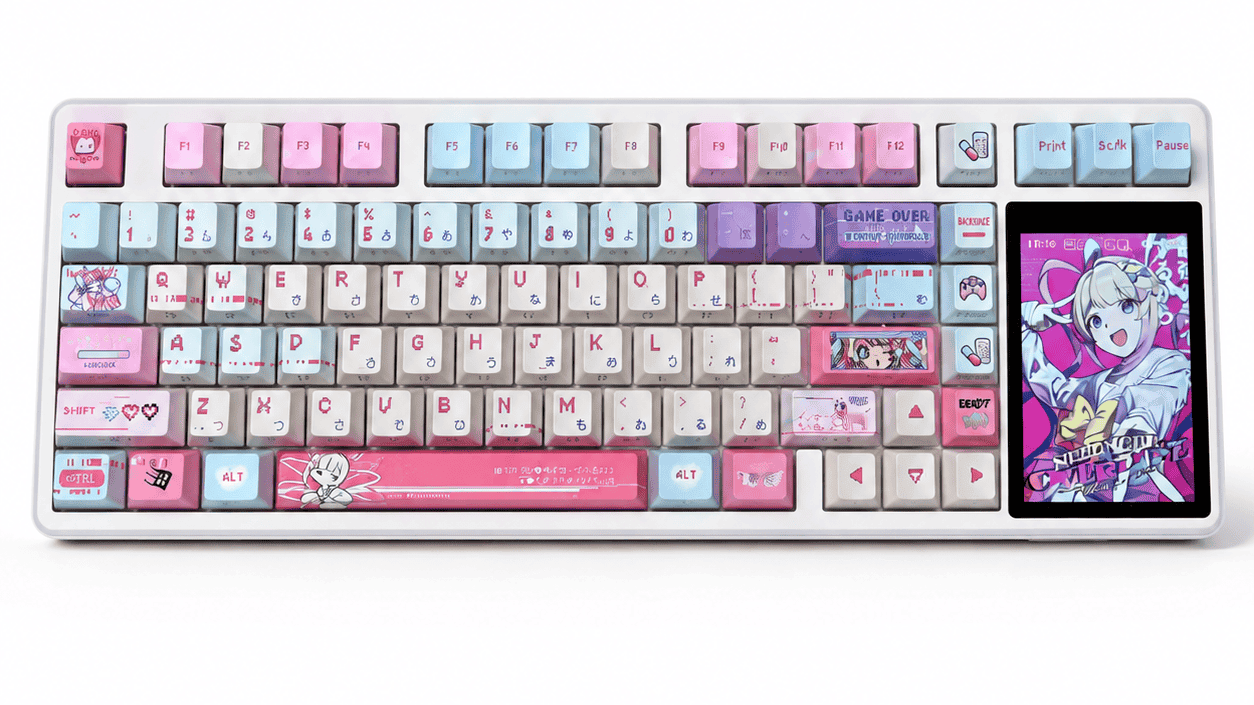
IL AULA L99 mechanical keyboard takes the concept much further by replacing the traditional number-pad area with a 3.98-inch IPS touchscreen. It can display system information, control media, function as a calculator, provide a virtual numpad, emulate a mouse, and show custom GIFs or images.
After spending two weeks with the keyboard, one thing became clear: the L99’s touchscreen is more than decoration. It changes how the keyboard fits into a desktop setup—but not without introducing a few compromises.
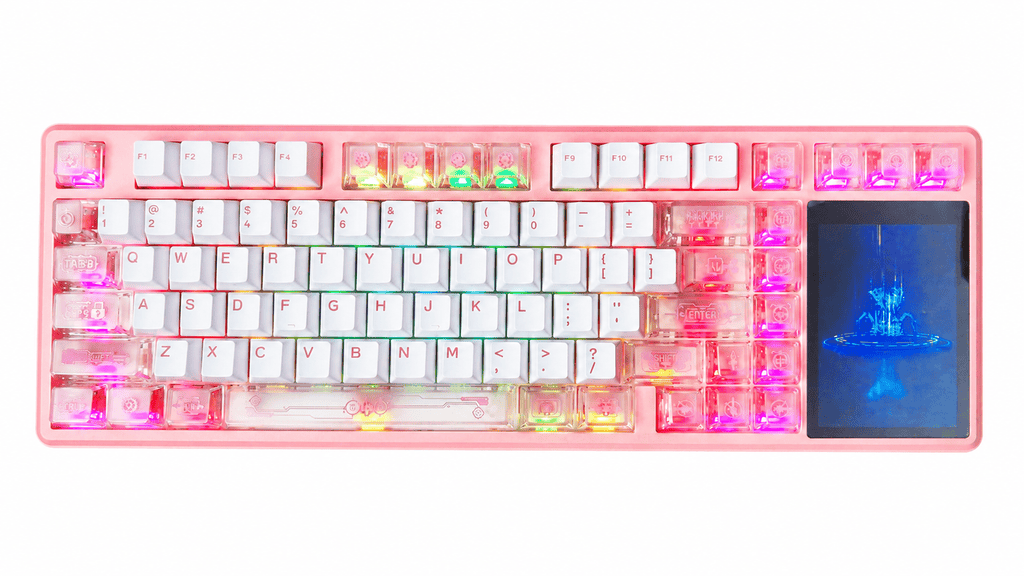
AULA L99 Specifications at a Glance
Before discussing the real-world experience, here is a quick overview of the main specifications.
| Caratteristica | AULA L99 Specification |
|---|---|
| Disposizione | 84-key compact layout |
| Display | 3.98-inch IPS touchscreen |
| Resolution | 320 × 480 |
| Connettività | 2.4GHz wireless, Bluetooth 5.0, USB-C wired |
| Mounting structure | Supporto guarnizione |
| Piatto | Single-key slotted PC plate |
| Switch support | Sostituibile a caldo |
| Switch options | Caramel Latte or Tingyu linear switches |
| Batteria | 8000mAh |
| Screen functions | Numpad, calculator, media controls, mouse simulation, GIF/JPG display |
| Personalizzazione | RGB lighting, custom images and animations |
| Adjustable feet | Dual-stage |
The combination of an 84-key layout and a large touchscreen gives the L99 a relatively compact footprint while preserving some of the functions normally associated with a full-size keyboard.
First Impressions: The Screen Is the Main Attraction
The first thing you notice about the AULA L99 is not the keycaps, case, or RGB lighting. It is the screen.
A 3.98 inches, the display occupies almost the entire area where a physical number pad would normally sit. Its 320 × 480 resolution is sufficiently sharp for status information, calculator controls, media widgets, images, and animated GIFs.
The IPS panel also makes a meaningful difference. Colors look vivid, and the display remains readable from wider angles than the smaller TN or basic TFT panels commonly found on mechanical keyboards.
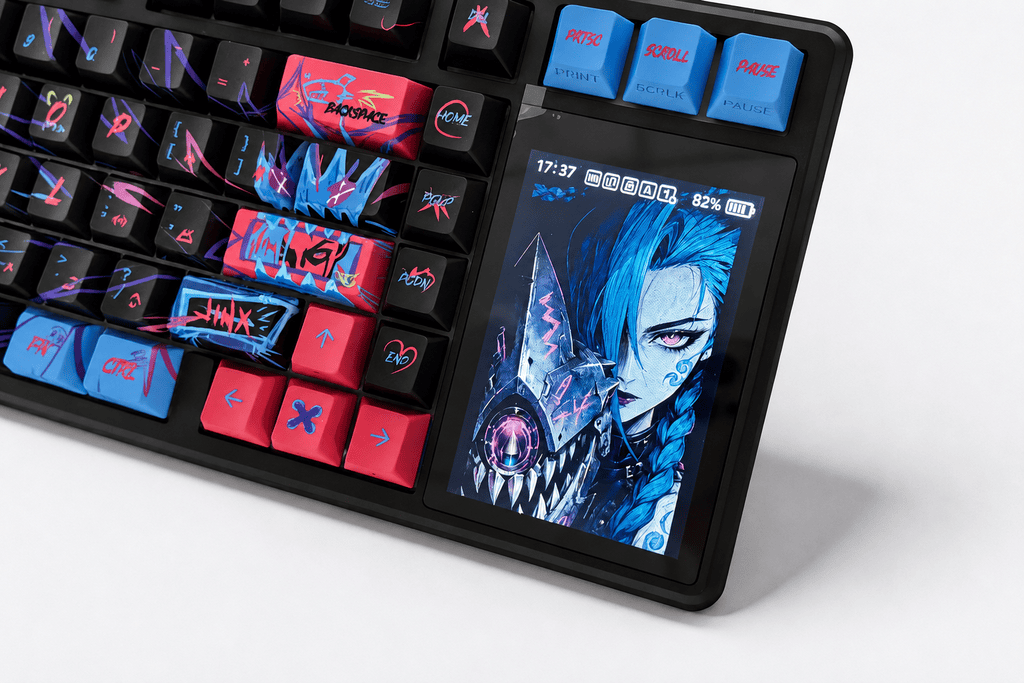
An 84-key layout that saves desk space
The L99 uses an 84-key compact layout, saving approximately 20% of the desk space occupied by a conventional 104-key keyboard. That creates more room for mouse movement, which may appeal to gamers and users with smaller desks.
The trade-off is obvious: there is no physical number pad.
AULA attempts to solve that problem by turning the touchscreen into a virtual numpad and multifunction control center. It is a clever solution, although its practicality depends heavily on how frequently you enter numbers.
The overall construction feels solid, while the PBT keycaps have a lightly textured surface that should resist shine better than typical ABS keycaps. Still, when the screen lights up, it predictably steals the show. The keyboard knows its party trick—and does not hide it.
What Can the AULA L99 Touchscreen Do?
The touchscreen experience can be divided into three categories: status information, practical controls, and advanced customization.
1. A convenient desktop information center
At its most basic level, the display works as a status dashboard. It can show useful information such as:
- Time and date
- Battery level
- Current connection mode
- Keyboard settings
- Lighting or performance information
Having this information directly on the keyboard is surprisingly convenient. Instead of checking a Bluetooth menu or waiting for a low-battery notification, you can glance down and immediately confirm the keyboard’s status.
This may sound like a small improvement, but it makes the L99 feel more interactive than a conventional mechanical keyboard. The screen gives the device a sense of activity rather than functioning as a static decorative panel.
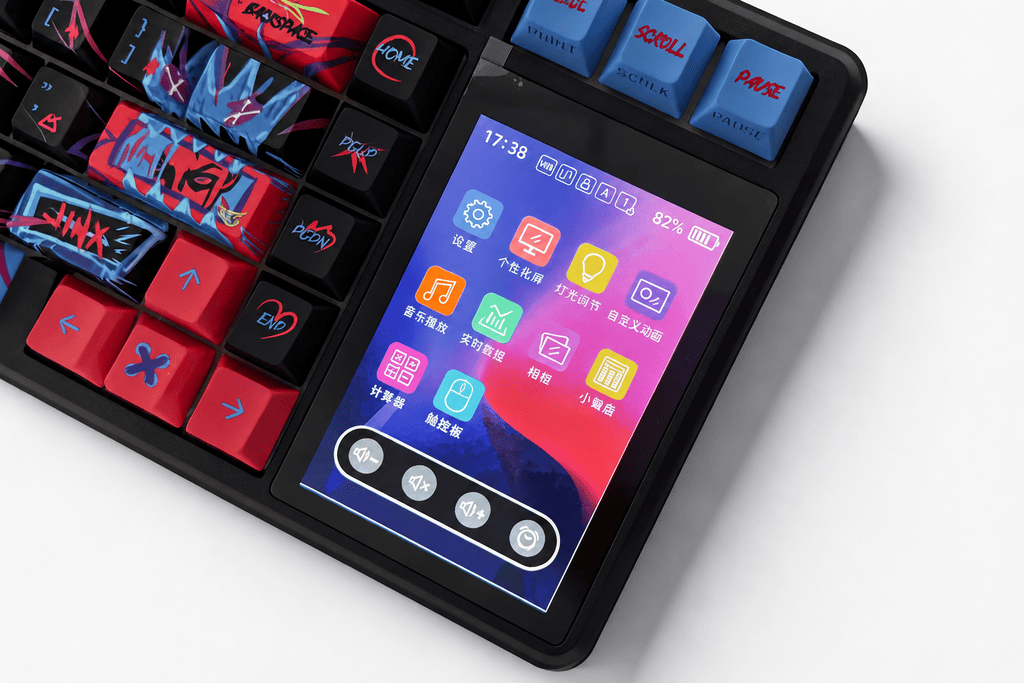
2. Virtual numpad, calculator, and media controls
The more ambitious purpose of the display is to replace several physical controls.
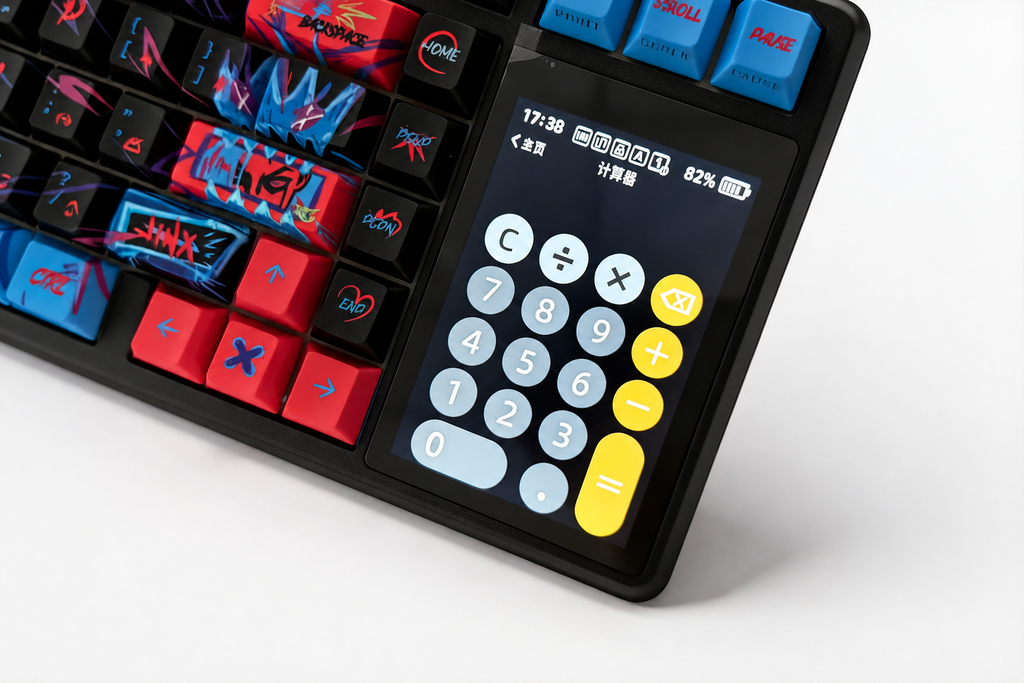
Built-in calculator
The calculator is one of the most practical tools on the L99. When working with reports, budgets, or quick measurements, it is faster to use the keyboard’s screen than to open a calculator app or reach for a phone.
It is not a revolutionary feature, but it fits naturally into productivity workflows.
Music and volume controls
Media control is arguably the most useful everyday function.
The touchscreen allows you to:
- Adjust volume
- Play or pause media
- Skip tracks
- Return to the previous track
Sliding a volume control is more intuitive than memorizing a function-key combination. It also keeps the main keyboard layout uncluttered.
Virtual number pad
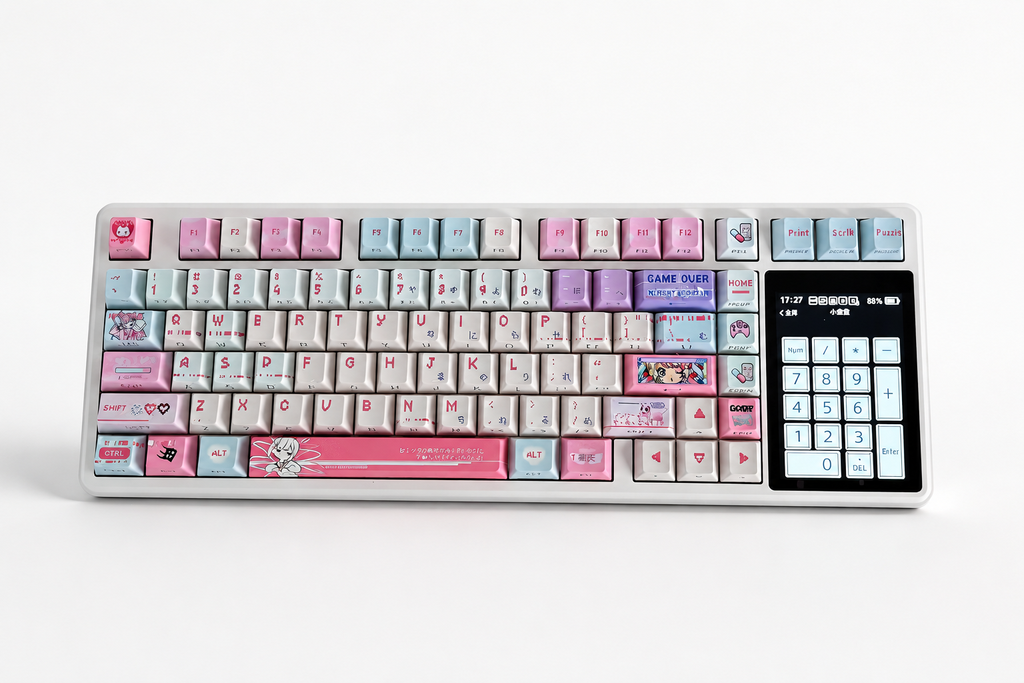
The screen can display a complete virtual numpad, allowing the compact L99 to provide occasional numerical input without requiring a separate keypad.
However, this is also where the limitations of touchscreen input become most apparent.
A physical numpad can be operated by touch because each key has shape, spacing, and travel. On a flat touchscreen, there is no tactile reference point. You must look down to locate each number accurately.
For entering an occasional phone number, price, or short calculation, the virtual numpad works well enough. For accounting, data entry, or other number-heavy work, it cannot fully replace physical keys.
This is not a flaw unique to the AULA L99. It is an inherent limitation of virtual keyboards.
3. Mouse simulation and screen customization
Because the display is touch-sensitive, it can also emulate basic mouse or touchpad movement.
Cursor tracking is responsive enough for emergency use, but the screen is too small to replace a proper mouse for precise work. It is best treated as a backup option—for example, when a wireless mouse unexpectedly runs out of power.
The customization features are more entertaining. Users can upload custom GIF and JPG files, turning the display into a small digital canvas. It can show animated artwork, a favorite character, a compact reference image, or graphics matched to a desktop theme.
That is where the larger screen becomes genuinely valuable. A tiny OLED can display a logo; the L99 can display something detailed enough to become part of the visual identity of a setup.
Typing Experience: More Than a Keyboard With a Screen
A large touchscreen would not matter much if the keyboard itself felt mediocre. Fortunately, the AULA L99 backs up its visual gimmick with a strong mechanical foundation.
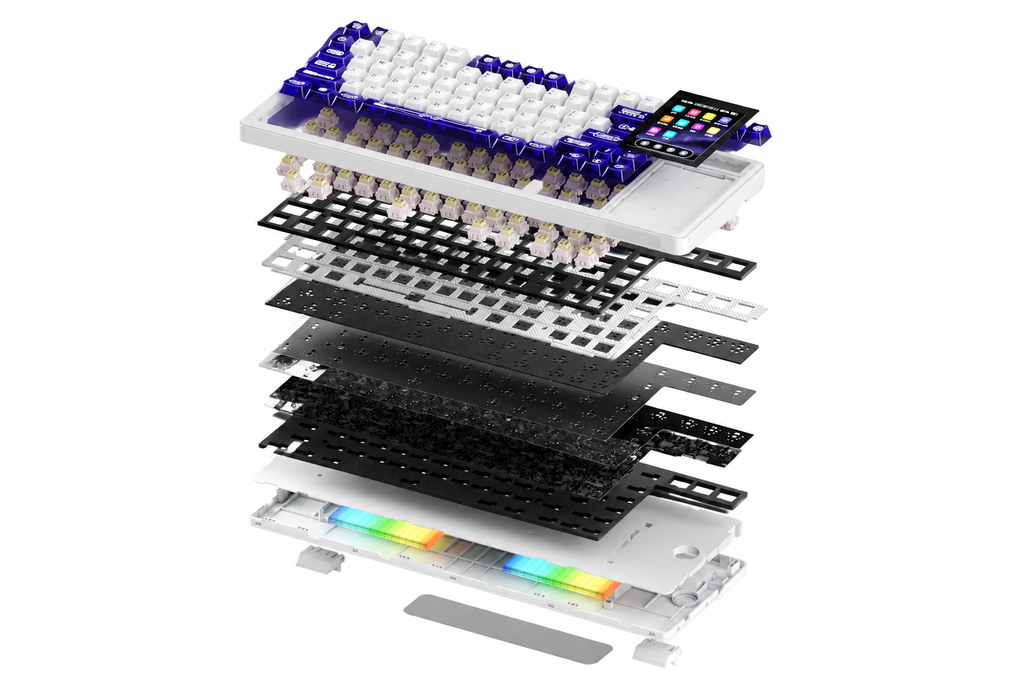
Gasket mount and six-layer sound dampening
The L99 uses a struttura montata su guarnizione with a flexible, single-key slotted PC plate. It also incorporates six layers of acoustic material:
- PO sound-absorbing foam
- PET isolation pad
- pannello di commutazione PO
- PET spacer
- PO bottom foam
- Silicone bottom pad
This construction produces a soft, cushioned typing sensation. Bottoming out feels controlled rather than harsh, and the case transmits relatively little unwanted vibration.
The sound profile is clean, full, and muted. Hollow case resonance is kept under control, making the L99 suitable for shared spaces or late-night typing.
Enthusiasts can debate “creamy,” “thocky,” and “marbly” sound descriptions until the coffee gets cold. The simpler explanation is that the L99 sounds polished without requiring immediate modification.
Supporto per interruttori sostituibili a caldo
The keyboard is hot-swappable, so compatible switches can be replaced without soldering. That is valuable for users who want to experiment with different sound and feel profiles later.
The standard configurations include two AULA linear switches: Caramel Latte E Tingyu.
Caramel Latte vs. Tingyu Switches
Both switch options are linear, but they have slightly different characteristics.
| Specifiche | Caramel Latte Switch | Tingyu Switch |
|---|---|---|
| Initial force | 45 ± 8gf | 45 ± 10gf |
| Bottom-out force | 55 ± 8gf | 55 ± 10gf |
| Actuation travel | 2,0 mm | 1.8 ± 0.4mm |
| Total travel | 3,6 mm | 3.6 ± 0.4mm |
| Notable material | POK top housing | Self-lubricating POM stem |
| Best suited for | Controlled typing | Faster response |
Caramel Latte switch
The Caramel Latte switch has a 2.0mm actuation point, giving it a slightly more deliberate feel. It is a good option for typing and general productivity, especially for users concerned about accidental key presses.
Tingyu switch
The Tingyu switch has a shorter nominal actuation distance and a self-lubricating POM stem. It feels smooth and responsive, making it the more natural choice for gaming or users who prefer faster key activation.
Neither switch is objectively better. Choose Tingyu for speed and smoothness, O Caramel Latte for a slightly more controlled typing experience.
Connectivity and 8000mAh Battery
The AULA L99 supports three connection modes:
- wireless a 2,4 GHz
- Bluetooth 5.0
- USB-C wired
This makes it suitable for desktop computers, laptops, tablets, and multi-device workspaces. The 2.4GHz connection is the preferred wireless option for gaming, while Bluetooth is convenient for office systems and portable devices.
How long does the battery last?
Il incorporato batteria da 8000 mAh is unusually large for a mechanical keyboard, particularly one with a color touchscreen.
Real-world endurance depends on several variables:
- RGB brightness
- Screen brightness
- Wireless mode
- Screen usage
- Sleep settings
- Daily typing time
With moderate backlighting, the keyboard can comfortably operate for an extended period between charges. Turning off RGB lighting should increase runtime considerably.
The large battery does not make charging disappear forever—physics remains stubborn—but it substantially reduces battery anxiety.
The keyboard also includes thoughtful practical details, such as a protected top connection area and storage for the 2.4GHz receiver.
AULA L99 Pros and Cons
The L99 combines a capable mechanical keyboard with one of the largest integrated touchscreens in its category. Its strengths are easy to appreciate, but the compromises matter.
| Vantaggi | Svantaggi |
|---|---|
| Large 3.98-inch IPS touchscreen | Virtual numpad is difficult to use without looking |
| Useful calculator and media controls | Advanced customization requires software |
| Custom GIF and JPG support | Touchpad mode cannot replace a proper mouse |
| Soft gasket-mounted typing feel | No physical number pad |
| Six-layer acoustic dampening | Screen increases power consumption |
| Supporto per interruttori sostituibili a caldo | More complex than a conventional keyboard |
| Connettività trimodale | Screen quality should be checked after delivery |
| Large 8000mAh battery | Not ideal for number-heavy professional work |
The main decision comes down to whether the touchscreen’s versatility is worth giving up a physical numpad.
Potential Issues to Consider Before Buying
No keyboard is perfect, and the AULA L99 has three notable limitations.
The virtual numpad cannot match physical keys
The touchscreen numpad is useful for occasional input, but it is not appropriate for frequent numerical entry. Accountants, financial analysts, and data-entry professionals will probably work faster with a conventional full-size keyboard or a separate physical numpad.
Advanced screen functions require software
Basic keyboard functionality works without extensive configuration, but features such as uploading GIFs and customizing the screen may require AULA’s software.
This is a reasonable requirement, although it adds another application to install and manage. Software support and operating-system compatibility should be checked before purchase.
A touchscreen creates another possible failure point
A conventional keyboard is mechanically straightforward. Adding a display, touch controls, and supporting firmware increases complexity.
Some user discussions have mentioned isolated screen or firmware issues. These do not necessarily indicate a widespread defect, but buyers should confirm the seller’s return and warranty policies. After receiving the keyboard, test the display, touch input, wired mode, wireless connections, and image-upload function promptly.
Who Should Buy the AULA L99?
IL AULA L99 is best suited to users who want a compact keyboard without giving up every benefit of a number pad or desktop control panel.
It makes sense for:
- Giocatori who want more mouse space and a customizable display
- Mechanical keyboard enthusiasts interested in unusual features
- Content creators who frequently use media controls
- Productivity users who only occasionally need a numpad
- Desk-setup enthusiasts who enjoy GIFs and visual customization
- Wireless users who value a large battery
- Beginners who want a refined typing sound without extensive modification
It is less suitable for:
- Accountants and data-entry professionals
- Users who rely heavily on blind numpad input
- Minimalists who do not want configuration software
- Buyers who prefer a simple keyboard without screens or extra electronics
Final Verdict: Useful Innovation or Just a Gimmick?
The AULA L99 turns the mechanical keyboard from a simple input device into a small desktop control center.
Its 3.98-inch touchscreen is large enough to provide practical functions rather than merely display a logo. The calculator, media controls, status dashboard, virtual numpad, mouse simulation, and custom image support all give the screen a legitimate purpose.
At the same time, it does not completely replace the hardware it imitates. The virtual numpad lacks tactile feedback, while mouse simulation is better for emergencies than daily navigation. Advanced personalization also depends on software.
What makes the L99 compelling is that the rest of the keyboard is not neglected. Its gasket-mounted structure, six-layer dampening system, hot-swappable switches, tri-mode connectivity, and 8000mAh battery give it substance beyond the screen.
IL AULA L99 is not a perfect keyboard, but it is a memorable one. For users who want compact dimensions, satisfying acoustics, long wireless endurance, and an unusually versatile display, it offers something genuinely different in a market full of increasingly similar designs.
 English
  German
  Portuguese
  Spanish
  Italian
  Finnish
  French
  Japanese
  Korean
  Swedish