
Winning a duel in a tactical shooter often comes down to milliseconds—and more specifically, to how fast you can stop moving. This guide breaks down exactly how magnetic (Hall effect) switches and Rapid Trigger transform your counter-strafing, then walks you through tuning the ATK VELOTA FUZZY 63 V2 step by step for CS2, Valorant, and Apex Legends. By the end, you’ll know the precise actuation and reset values to dial in, how to verify them in-game, and how to troubleshoot the most common mistakes.
Why Hall Effect Switches Change the Way You Play FPS
Picture the moment: mid on Dust2 in CS2. You press D to peek, flick your crosshair onto the enemy, and fire—but your bullets spray wide. Why? Because your character was still sliding. You never completed the counter-strafe.
This is where traditional mechanical keyboards fail competitive players.
The Hidden Flaw in Mechanical Switches
On a standard mechanical board, a key must travel back up past a fixed reset point before it can register again. That built-in “reset dead zone” delays every direction change—and in an FPS, delay means missed shots.
How Magnetic Switches + Rapid Trigger Break the Rule
A Hall effect switch reads magnetic field changes instead of physical metal contacts. Paired with Grilletto rapido, the logic changes completely:
- Lift your finger just 0.1mm → signal cuts immediatamente.
- Press back down slightly → signal fires immediatamente.
Counter-strafing is no longer a two-step “release → re-press” motion. It becomes a single fluid “micro-lift to stop, micro-press to move.”
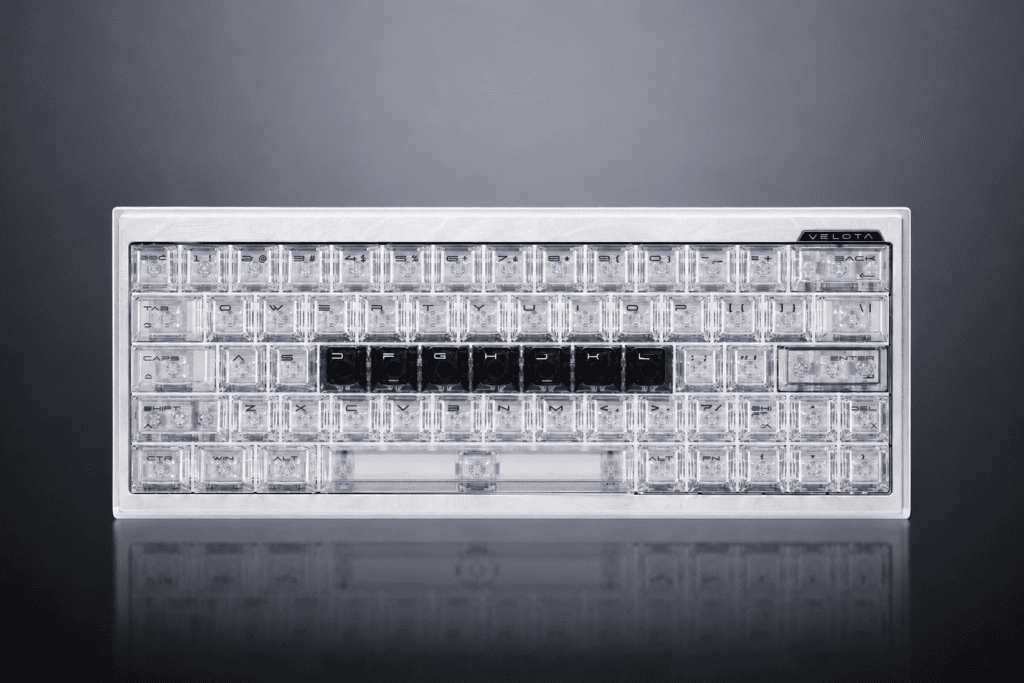
What Makes the FUZZY 63 V2 Fast
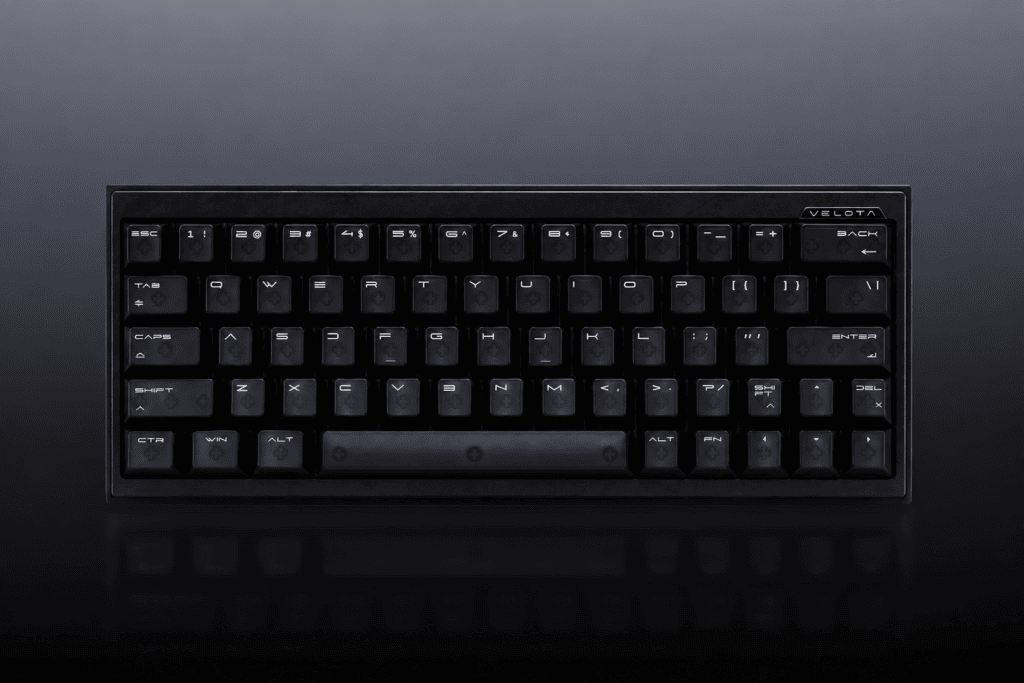
IL Tastiera ATK VELOTA FUZZY 63 V2 con effetto Hall is engineered specifically for this edge:
- Latenza di pressione: 0,22 ms E Latenza di rilascio di 0,28 ms (full-chain)
- Frequenza di campionamento di 8 kHz con un Frequenza di scansione dei canali di 4696 kHz
- 0.001mm Rapid Trigger precision, adjustable across 0,001–3,2 mm
Translated into game terms: your counter-strafe fires a few milliseconds faster than your opponent’s—and in a fair fight, that’s the margin of victory.
How Magnetic “Counter-Strafing” Actually Works
To tune your keyboard well, it helps to understand the mechanism underneath.
Traditional Mechanical vs. Hall Effect
Here’s a side-by-side look at why magnetic switches win for movement-heavy games:
| Confronto | Meccanica tradizionale | Hall Effect (FUZZY 63 V2) |
|---|---|---|
| Detection method | contatto fisico metallico | Hall effect magnetic sensing |
| Punto di attuazione | Fixed (e.g., 2.0mm) | Adjustable (0.001–3.2mm) |
| Reset condition | Must return to fixed reset point | Resets the instant you lift |
| Counter-strafe motion | Full release → re-press opposite key | Micro-lift → opposite key auto-fires |
The takeaway: mechanical switches force a full reset cycle, while Hall effect switches let you reset anywhere in the travel.
The Core Logic of Rapid Trigger
Rapid Trigger works by decoupling the actuation point from the reset point:
- Traditional: press to 2.0mm to fire → release above 2.0mm to reset → press to 2.0mm again to re-fire.
- Attivazione rapida: press to 0.2mm to fire → lift just 0.1mm to reset → press 0.1mm again to re-fire.
That means within a single 1mm of travel, you can complete 4–5 independent fire/reset cycles. For continuous counter-strafing and rapid peeking, this feels almost like a physical cheat code—except it’s completely legal.
Why “Frame-Sync” Matters
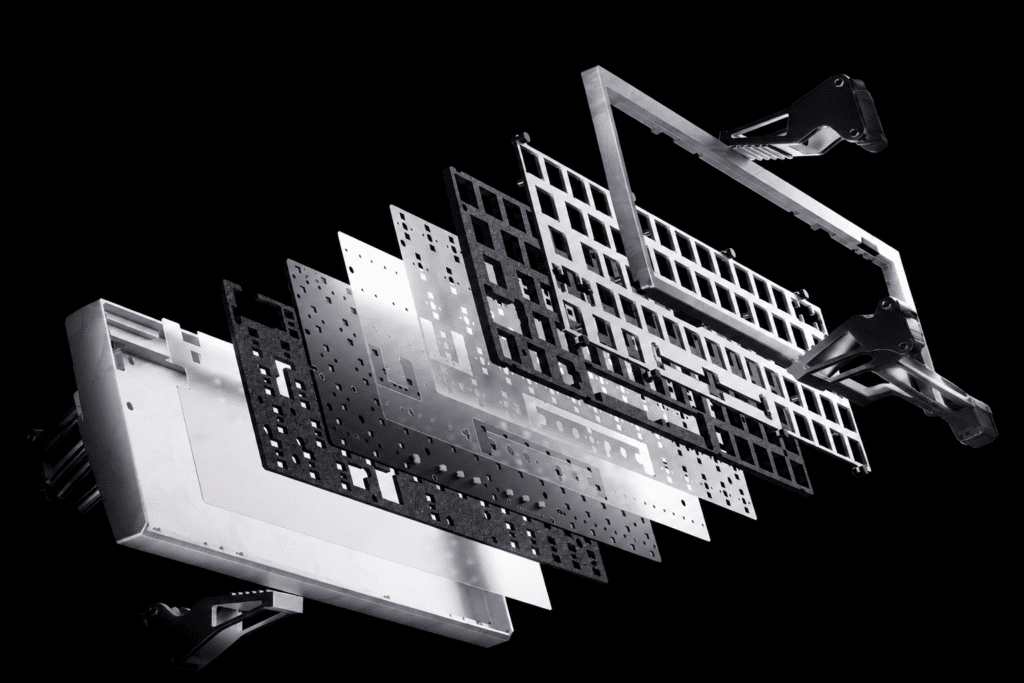
The FUZZY 63 V2 runs a proprietary Architettura Tri-Core Frame-Sync—three high-frequency MCUs (600MHz + 240MHz×2) forming a distributed co-processing setup that suppresses timing drift and input jitter at the hardware level. Combined with the MagNeural smart Hall sensor coprocessor, it delivers true “press-to-trigger” response.
In plain language: it’s not just fast—every trigger fires at a consistent, jitter-free moment. Consistency is what builds reliable muscle memory.
Tuning Guide: The Full ATK HUB 3.0 Setup Workflow
The FUZZY 63 V2 uses the web-based ATK HUB 3.0 driver—no client download required. Here’s the complete walkthrough.
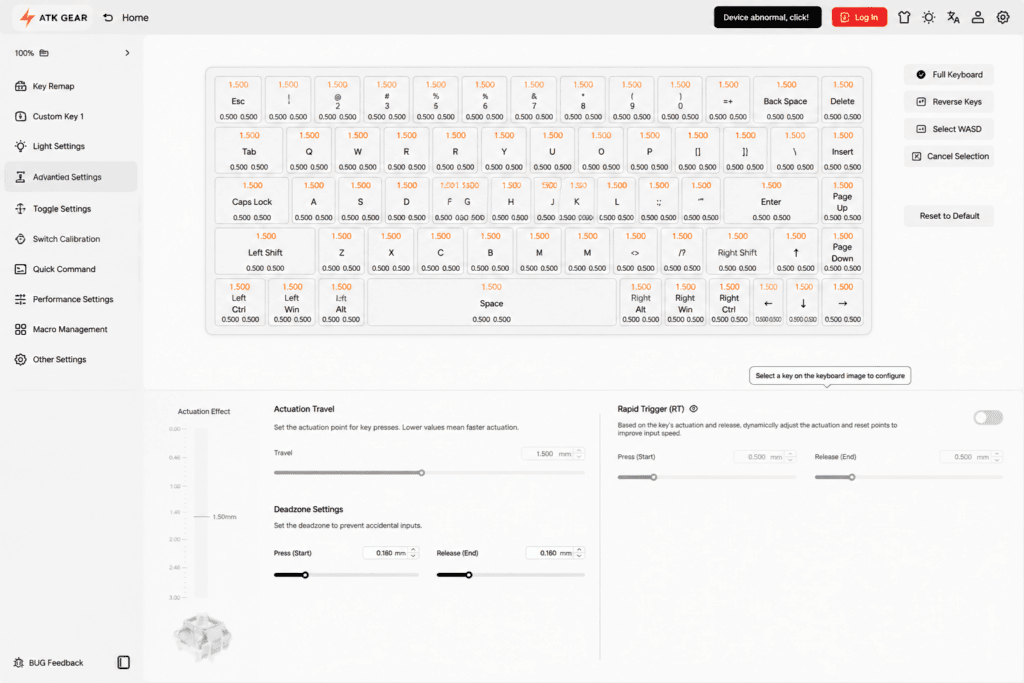
Step 1 — Open the Driver & Detect the Keyboard
Launch your browser → open the ATK HUB 3.0 web page → the keyboard is detected automatically.
Step 2 — Enter Magnetic Switch Settings
On the main interface, find “Magnetic Switch Settings.” This is the central hub for every per-key adjustment.
Step 3 — Enable Rapid Trigger on WASD Only
Do not enable it globally. Turn Rapid Trigger on for just the four movement keys.
- Click or drag-select W, A, S, D.
- Toggle the Grilletto rapido switch on.
- Imposta il Trigger Distance E Reset Distance individually.
Step 4 — The “Golden Formula” for Trigger & Reset
This is the heart of the entire guide.
- Actuation Point (Trigger Distance): how far you press before the signal fires.
- Reset Point (Reset Distance): how far you lift before the signal cuts off.
Use this recommended framework as your starting point:
| Parametro | Aggressive (Advanced / Movement Players) | Balanced (Recommended for 90%) | Conservative (Beginners / Anti-Misfire) |
|---|---|---|---|
| Trigger distance | 0,1–0,3 mm | 0.4–0.6mm | 0.8–1.2mm |
| Reset distance | 0,1–0,3 mm | 0.3–0.5mm | 0.5–0.8mm |
Core principles:
- Keep the reset point slightly higher than the trigger point so the key fully resets before firing again.
- Don’t blindly max out the lowest settings—over-aggressive values cause misfires when your finger merely rests on a keycap.
- Start Balanced, then fine-tune toward your personal feel.
Concrete example: Set W to a 0.3mm trigger E 0.1mm reset. While holding W to move, a counter-strafe only requires lifting about 0.1mm. Stopping is no longer “lift to the top, then press”—it’s “micro-lift to stop, micro-press to go.”
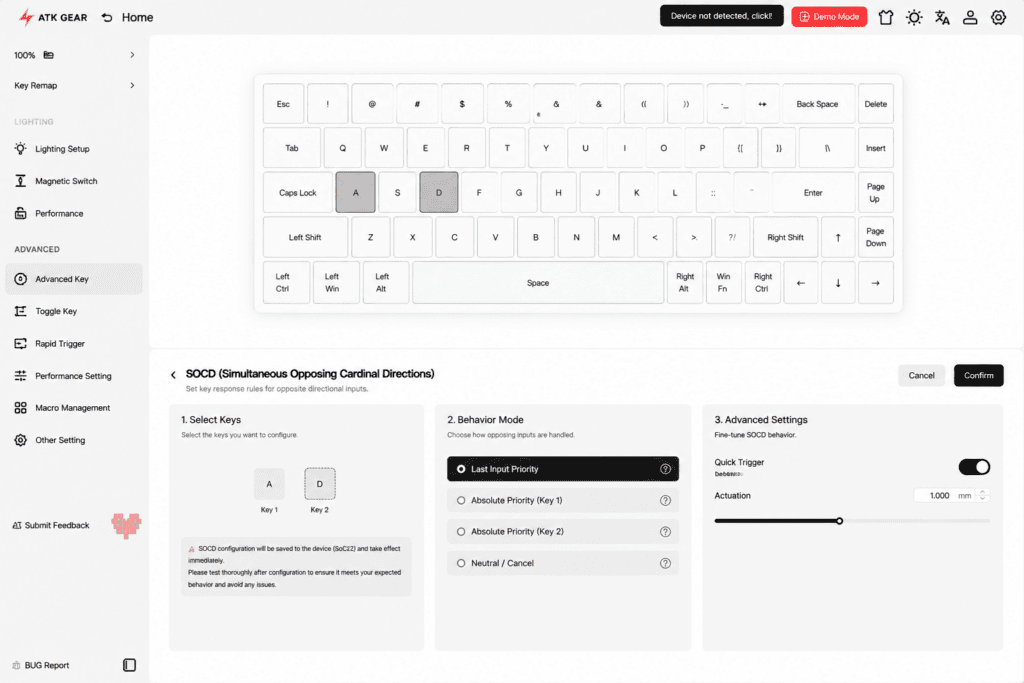
Step 5 — SOCD (Optional)
Some magnetic drivers support SOCD (Simultaneous Opposing Cardinal Directions). When enabled, pressing A and D together lets the driver decide which input wins—useful for cleaner counter-strafing. Enable it based on your personal preference.
Recommended Configurations by Game
Different games reward different tuning. Here’s where to start for each.
Valorant
Valorant demands frequent, precise counter-strafes and heavy movement play. Go aggressive:
- Trigger: 0,1–0,3 mm
- Reset: 0.2–0.4mm
- Attivazione rapida: WASD only
CS2
CS2 rewards precise recoil control and angle-holding. Go balanced:
- Trigger: 0.4–0.6mm
- Reset: 0.3–0.5mm
- Attivazione rapida: WASD only
Apex Legends / Other FPS
Apex involves complex movement (slides, wall bounces), so tune specific keys individually:
- Shift (sprint): 0.5mm trigger — prevents accidental stops mid-run
- Space (jump): 0.3mm trigger — enables fast bunny-hops
- WASD: 0.3–0.5mm
How to Verify Your Settings Actually Work
Numbers on a screen mean nothing until they translate to in-game feel. Here’s how to test.
The Practice-Range Method
- Enter the training range and enable key input display.
- Premere D to move → gently lift D (don’t fully release) → watch whether your character stops immediately.
- Still sliding? → your reset distance is too high → lower it by 0.1mm.
- Misfiring while standing still? → your trigger distance is too low → raise it by 0.1mm.
The Gunfight Method
Test in a deathmatch server:
- Is your first shot after a counter-strafe stable? If not, your stop is too slow—lower the reset point further.
- Does peeking feel “sticky”? That lag means your trigger distance is too high—lower it by 0.1mm.
The Fine-Tuning Rule
Change only 0.1mm at a time, play two rounds, feel the difference, then decide the next step. The 0.001mm precision exists for pros—for most players, 0.1mm steps are already plenty granular.
FAQ & Troubleshooting
Quick answers to the most common questions players run into.
Q1: After enabling Rapid Trigger, I keep misfiring while typing. What now? Enable Rapid Trigger on WASD only in ATK HUB, leaving other keys at default. Alternatively, raise the trigger distance above 0.6mm.
Q2: My character seems to “freeze” during a counter-strafe. Check that your reset distance is higher than your trigger distance. If reset sits below trigger, the key may never reset. The correct relationship is always: reset point > trigger point.
Q3: Do I need to switch settings between different games? No manual reconfiguring needed. ATK HUB supports multiple profiles, so you can save separate setups for CS2, Valorant, and Apex, then switch with one click.
Q4: Do I need to update the firmware? Check ATK HUB periodically for updates. The VELOTA series uses smart Hall compensation to counter thermal drift, and firmware updates further optimize trigger stability during long sessions.
From “Knowing the Settings” to “Owning the Counter-Strafe”
A Hall effect keyboard isn’t a magic wand you plug in to instantly rank up. The real formula is simple: correct settings + enough practice = genuine improvement.
Three closing tips to keep in mind:
- Start with Balanced parameters (trigger 0.4–0.6mm / reset 0.3–0.5mm)—don’t chase extremes on day one.
- Adjust only 0.1mm at a time, play two rounds, then refine.
- Settings only solve hardware latency. Your timing and crosshair placement still come down to muscle memory.
The hardware gives you the ceiling—a board like the ATK VELOTA FUZZY 63 V2 removes the physical bottleneck between your intent and the game. The rest is practice. Dial in your values, hit the range, and start winning the duels you used to lose by a few milliseconds.

 English
  German
  Portuguese
  Spanish
  Italian
  Finnish
  French
  Japanese
  Korean
  Swedish