
Split keyboards have always come with a quiet catch. They promise healthier wrists and a more natural posture, yet the moment you pull the two halves apart, there’s often no easy way back to the layout your fingers already know. The ZORNHER ST68 Split-Keyboard rewrites that story. Instead of forcing you to choose between split Und unified, it lets you switch freely between both — connect the two halves with a single cable, and it becomes a traditional board again. Let’s unpack how a single keyboard manages to live two lives at once.

The Ultimate Dilemma of Split Keyboards
To understand why the ST68 matters, it helps to look at the trade-off every split keyboard user faces.
The Upside Everyone Wants
- Ergonomics first: a split layout follows your natural shoulder width instead of cramming your hands together.
- Wrist health: less ulnar deviation means less strain during long sessions.
- Natural typing posture: your forearms open up, and your fingers rest rather than reach.
The Barrier That Holds People Back
- Broken muscle memory: years of typing habits get disrupted overnight.
- Gaming impact: fast-reaction titles suffer when your hands hunt for keys.
- A long adaptation curve: most split boards demand weeks of retraining.
Here’s the core problem: a standard split keyboard is a one-way door. Once you commit, you either fully adapt or give up entirely.
The ST68 offers a third answer — a reversible one. And that reversibility is the heart of its “dual life.”

The First Face: Split Mode — Built for Your Wrists
In its split form, the ST68 is engineered around one goal: sustainable comfort.
The Physics of Ergonomics
The design translates comfort into concrete geometry.
- 15° natural splay: the left and right key zones open like butterfly wings, keeping your wrists straight instead of twisted.
- 3° forward tilt: reduces wrist extension so your fingers land at a more natural angle.
- Open shoulders, 90° elbows: you tap the keys like piano keys rather than reaching for them.
A Typing Angle That’s Truly Yours
Because both halves adjust independently, you control the spacing and angle.
- Fine-tune the distance between halves to match your shoulder width.
- Dial in the angle that feels effortless for dein Hände.
- Enjoy a posture that stays comfortable through long workdays or extended gaming.
The Hardware Behind the Comfort
Comfort means little without a quality foundation, and the ST68 delivers on the build.
| Komponente | What It Offers |
|---|---|
| Gasket structure + hot-swap PCB | Compatible with both 3-pin and 5-pin switches, no soldering |
| Factory-lubed linear switches | Smooth keypress, crisp rebound, satisfying “thocky” sound |
| PBT keycaps + side-printed legends | Shine-resistant, oil-resistant, long-lasting texture |
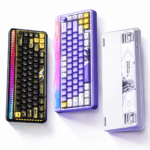
| 22 RGB presets + edge glow | Immersive lighting and desk-wide ambiance |
| 3000mAh battery, tri-mode | USB-C / 2.4G / Bluetooth 5.0 — freedom from cables |
Together, these turn the ergonomic split mechanical keyboard into something you actually want to type on all day.

The Second Face: Unified Mode — A Safety Net for Habits
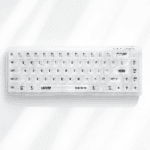
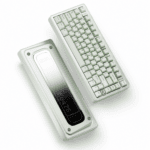
This is where the ST68 separates itself from the pack. Its most distinctive feature is the ability to reassemble into a traditional keyboard.
How Do the Halves Merge?
The process is refreshingly simple.
- Verwenden Sie die included coiled Type-C cable to link the left and right halves.
- The two halves join via a snug fit, forming one continuous layout.
- Officially, this converts the board into a more traditional, single-board TKL-style keyboard.
Why Merging Matters: The “Undo Button” for Split Keyboards
Most split boards force a permanent change. The ST68 doesn’t — and that’s the point.
- Split mode → daily office work and long typing sessions, where ergonomic comfort wins.
- Unified mode → competitive gaming and any scenario that relies on muscle memory, where familiarity wins.
The one-line summary: it lets you train on split without throwing your ranked matches into chaos.
Who Needs This Safety Net Most?
- Wettkampfspieler searching for balance between comfort and habit.
- Split-keyboard beginners who want a reassuring way back.
- Flexible-desk users who switch forms across different scenarios.

Unified vs. Split: Two Forms, Two Philosophies
Each mode serves a genuinely different purpose. Here’s a side-by-side view.
| Dimension | Split Mode | Unified Mode |
|---|---|---|
| Core goal | Ergonomics, wrist comfort | Muscle memory, competitive gaming |
| Typing angle | 15° splay + 3° tilt, fully adjustable | Traditional flat layout |
| Am besten geeignet für | Long office work, coding, daily use | FPS games, fast-reaction scenarios |
| Adaptation cost | Short-term (days, not months) | Zero — plug and play |
| Desk footprint | Separated, freely arranged | Compact, like a standard board |
The takeaway: you’re not buying one keyboard philosophy — you’re getting both, on demand.
A Real-World Scenario: Solving the “Either/Or” Trap
Theory is nice, but the value clicks when you picture a real week.
- Monday to Friday (Split Mode): at your office or study, the two halves sit apart at that 15° splay. Long coding sessions pass without wrist ache.
- Weekend ranked matches (Unified Mode): merge the halves back into a traditional layout. Your WASD position and muscle memory stay exactly the same — flick shots and combos remain buttery smooth.
- On a business trip (Tri-Mode Wireless): connect via Bluetooth to your laptop, and the 3000mAh battery easily lasts the whole trip.
The core value is simple: you never have to choose between comfort and habit — the ST68 gives you both.

Who Is It For — and Who Should Think Twice?
A great product still isn’t for everyone. Here’s an honest picture.
The ST68 Is for You If…
- You type for hours and have started feeling wrist or shoulder discomfort.
- You want to try a split keyboard but fear the adaptation — and want an “undo button.”
- You both game and work, and want to switch forms per scenario.
- You care about desk aesthetics — the Milk Coffee and Pink & Purple colorways are genuinely eye-catching.
- You’re willing to invest a few days adapting to split mode for long-term comfort.
You Might Want to Reconsider If…
- You chase peak esports performance and need precise latency specs — ZORNHER hasn’t published exact latency figures.
- You refuse beliebig muscle-memory disruption, even a short adaptation window.
- You expect Bluetooth latency to perfectly match wired.
- You dislike tinkering — while the ST68 supports remapping via its driver software, there’s a small learning curve.
Conclusion: One Keyboard, Two Lives
The lasting awkwardness of split keyboards has always been this: they’re excellent, but there’s no easy way back. Once you pull the halves apart and start adapting, returning to a traditional layout usually isn’t simple.
Der ZORNHER ST68 Split-Keyboard solves that with a single coiled cable. It lets you step In — and just as easily step out.
That’s not a compromise. It’s a smarter, flexible philosophy: split when you want comfort, merge when you want habit. Between health Und familiarity, the ST68 makes sure you never have to pick just one.

 English
  German
  Portuguese
  Spanish
  Italian
  Finnish
  French
  Japanese
  Korean
  Swedish