
고르기 기계식 키보드 2026년에는 단순히 스위치만 중요한 게 아닙니다. 레이아웃이 중요해졌죠. 적절한 크기는 FPS 게임에서 마우스 공간을 더 확보해 주고, 장시간 타이핑할 때 더 깔끔한 인체공학적 자세를 제공하며, 탐색 키나 숫자 키패드가 필요할 때 불편함을 줄여줍니다.
이 가이드에서는 가장 일반적인 레이아웃을 분석합니다.60%, 65%, 75%, 80%(TKL), 그리고 96%/100%—그러므로 책상 공간과 작업 흐름에 맞는 키보드를 선택할 수 있습니다. (키보드 크기에 익숙하지 않다면 RTINGS의 키보드 크기 가이드가 좋은 참고 자료가 될 수 있습니다.)
60% 키보드 레이아웃: 미니멀리스트의 꿈
레이아웃 설명
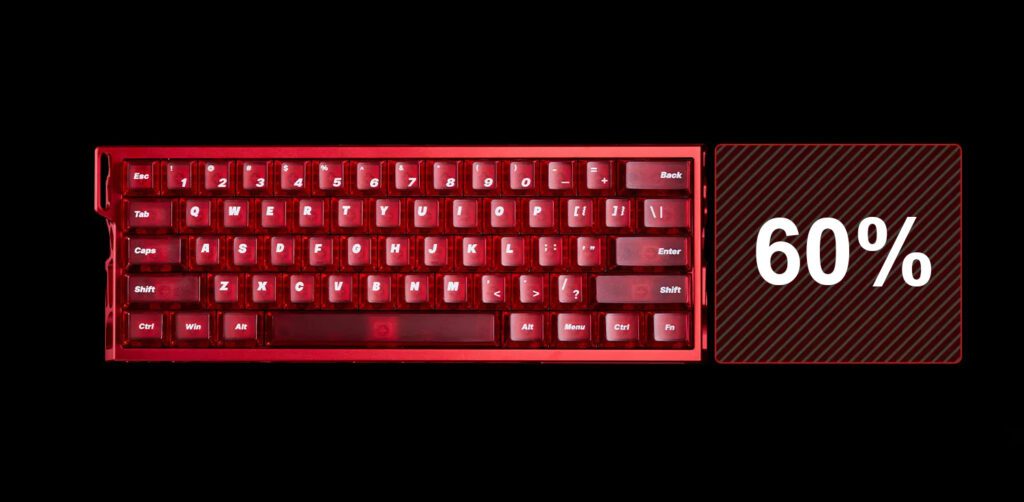
A 60% 키보드 레이아웃 키보드는 문자, 숫자, 특수 문자 등 핵심 입력 영역을 중심으로 설계되었습니다. 크기가 작은 이유는 일반적으로 F 키 행, 탐색 키(Insert/Home/Page 키), 그리고 전용 방향키를 제외했기 때문입니다.
그렇다면 이러한 기능들은 어디에 위치할까요? 대부분의 경우 키보드 60개, 누락된 키는 Fn 레이어(Fn 키를 누른 상태에서 접근하는 두 번째 "맵")에 저장되며, Shift 키를 누르면 숫자가 기호로 바뀌는 것과 유사합니다.
혹시라도 궁금해하신 적이 있다면 60 키보드의 기본 홈 키 키보드 설정에 대한 답은 일반적으로 Fn 레이어 단축키(종종 Fn + 근처 키)를 사용한다는 것입니다. 정확한 키 매핑은 보드/펌웨어에 따라 다릅니다. 60% 보드는 필수 키만 유지하고 나머지는 레이어 방식으로 처리합니다. 공간 활용에는 좋지만, 익숙해지려면 약간의 손동작 연습이 필요합니다.
최고 추천 상품: 매들리온스 매드 라이트 60HE
궁극의 미니멀리즘 구성을 원하신다면, 다음 제품을 강력 추천합니다. 매들리온스 매드 라이트 60HE.
주요 특징 및 기능
- 스위치 기술: 프리미엄 기능을 제공합니다 홀 효과 스위치 (자기)—심각한 홀 효과 키보드 속도를 위해 설계된 시스템입니다.
- 성능: 8kHz 폴링 속도와 128kHz 스캔 속도, 그리고 초저지연(0.1ms)을 자랑합니다. 만약 다음과 같은 기능을 찾고 있다면, 이 제품이 적합할 것입니다. 60 게이밍 키보드 또는 자석식 키보드.
- 맞춤 설정: 0.01~3.5mm(0.01mm 정확도)의 조절 가능한 래피드 트리거(RT) 범위와 DKS/MT/TGL/SOCD와 같은 고급 기능을 갖춘 진정한 명품입니다. 맞춤형 키보드 경험.
- 짓다: 견고한 CNC 알루미늄 합금 케이스, 투명한 체리 프로파일 PC 키캡, 키별 RGB 조명.
호환성 및 최적 사용 대상
- 시스템: 윈도우/맥.
- 다음과 같은 경우에 가장 적합합니다: 마우스 공간을 최대한 활용하고 레이어 구성에 개의치 않는 경쟁적인 게이머, 즉 빠른 움직임의 슈팅 게임과 최소한의 책상 환경을 선호하는 게이머에게 적합합니다.
65% 키보드 레이아웃: 게이머를 위한 최적의 레이아웃
레이아웃 설명
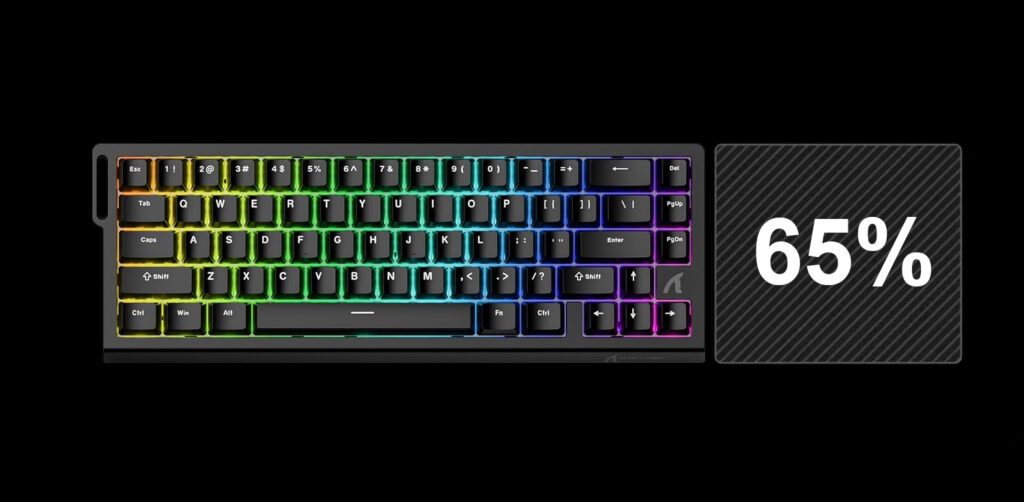
65% 레이아웃은 60%를 사용해 본 많은 사람들이 원했던 업그레이드 버전입니다. 컴팩트한 느낌은 그대로 유지하면서 게이머와 에디터들이 가장 아쉬워하는 기능인 전용 방향키를 추가했습니다.
발자국 모양이 마음에 드신다면 키보드 60개 하지만 이동, 코드 스크롤 또는 빠른 UI 탐색을 위해 화살표 키가 필요한 경우 65% 레이아웃이 가장 깔끔한 업그레이드 옵션인 경우가 많습니다. 다만 숫자 키패드와 F 키 행이 제거되어 일부 기능은 별도의 레이어에 남아 있습니다.
최고 추천 상품: 어택 샤크 X68 HE
경쟁 게임을 위한 최고의 선택은 바로 이것입니다. 어택 샤크 X68 HE.
주요 특징 및 기능
- 속도 및 투표: 8000Hz 폴링 속도 128kHz의 스캔 속도와 낮은 지연 시간(0.125ms)을 자랑합니다.
- 조절 가능한 작동 방식: 안 작동 지점 조절 가능 키보드 측정 범위는 0.1~3.4mm입니다(RT 정확도는 0.01mm로 표기됨).
- 빠른 트리거: ~을 중심으로 구축됨 어택 샤크 x68 고속 트리거 키보드 마그네틱 스위치 빠른 재설정을 위한 동작 방식 - 정지-출발 움직임 및 빠른 입력에 유용합니다.
- 짓다: 상단 장착형 자석 키보드 구조; 이중층 PORON 폼; 체리 프로파일 PBT 측면 인쇄 키캡.
- 스위치: 홀 효과 자기 스위치 설계(핫스왑 가능 자기 스위치).
호환성 및 최적 사용 대상
- 시스템: Windows, macOS 및 Linux; 완벽하게 맥 및 윈도우와 호환되는 게이밍 키보드.
- 다음과 같은 경우에 가장 적합합니다: 안 FPS 게임용 키보드 프로필(발로란트 스타일의 카운터 스트레이핑)과 빠른 입력 게임에 적합합니다. osu! 키보드 또는 기타 리듬 게임 키보드 설정.
75% 키보드 레이아웃: 완벽한 균형
레이아웃 설명
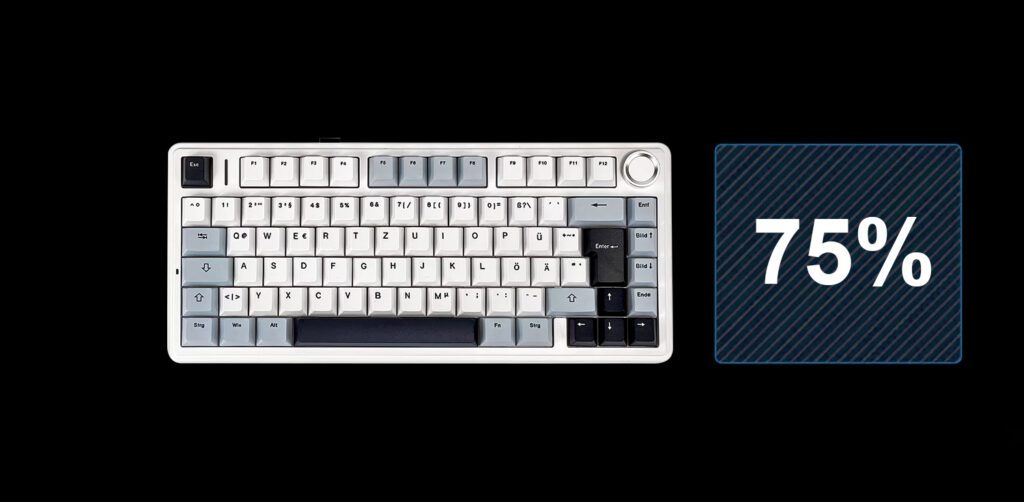
그만큼 75 키보드 레이아웃 책상 공간을 많이 차지하지 않으면서 기능 행을 복원해 주기 때문에 인기가 많습니다. 일반적으로 다음과 같은 이점을 얻을 수 있습니다.
- F열 전체(F1~F12)
- 방향키
- 소형 내비게이션 클러스터(종종 압축된 형태)
즉, 60/65 모델보다는 "일반적인" 키보드에 더 가까운 느낌이지만, 탄탄하고 효율적인 키감을 유지합니다. 많은 사람들이 업무와 여가 활동을 모두 만족시키는 최적의 키감이라고 평가합니다.
최고 추천 상품: 아울라 F75
널리 여겨지는 가성비 최고의 기계식 키보드, 확인해 보세요 아울라 F75.
주요 특징 및 기능
- 연결성: 3가지 모드 지원: 블루투스 5.0 + 2.4GHz + USB-C 유선 연결. 다양한 용도로 활용하기 좋습니다. 75 무선 기계식 키보드 기기를 전환할 수 있는.
- 무선 성능: 2.4GHz 모드는 1000Hz 폴링 속도를 지원합니다. 이는 다음과 같은 용도로 유용합니다. 무선 게이밍 키보드 설정.
- 핫스왑 가능: 진정한 핫스왑 가능한 기계식 키보드 (3핀 및 5핀 지원). 다양한 기능을 쉽게 시도해 볼 수 있습니다. 핫스왑 가능 키보드 스위치 또는 표준 체리 키보드 스위치.
- 레이아웃 옵션: 다양한 국제 옵션 포함 쿼티 타스타투르 그리고 쿼츠 타스타투르 다양한 변형 모델(ANSI 및 ISO 모델 목록).
- 빌드 참고 사항: 가스켓 마운트 설계; 회전식 노브; 이중 사출 PBT 키캡.
호환성 및 최적 사용 대상
- 시스템: 윈도우, macOS, 리눅스, iOS, 안드로이드.
- 다음과 같은 경우에 가장 적합합니다: 글쓰기/사무 업무와 게임을 병행하는 사람들 중, 풀사이즈 키보드는 원하지 않지만 F키가 필요한 사람들을 위한 제품입니다.
80% (TKL) 키보드 레이아웃: 클래식 표준
레이아웃 설명
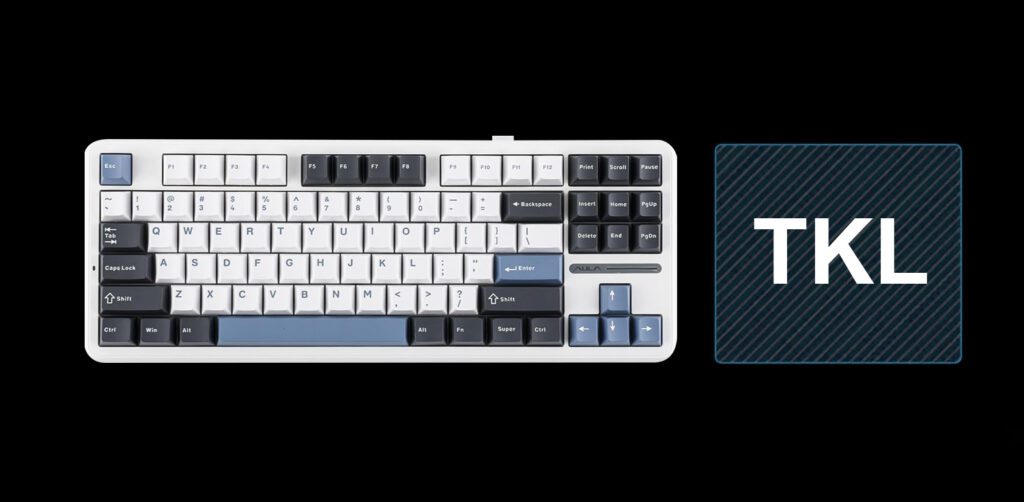
안 키보드 80% 일반적으로 tkl 키보드 레이아웃 ("텐키리스"): 숫자 키패드만 없을 뿐, 전체 타이핑 블록, 화살표 키, 탐색 키 및 F 행을 사용할 수 있습니다.
많은 책상에서 가장 눈에 띄는 인체공학적 이점은 바로 이것입니다. 마우스를 더 가까이 두면서도 자주 사용하는 키(화살표, Delete, F 키)는 그대로 유지할 수 있다는 점이죠. 이는 오랫동안 e스포츠 표준으로 자리 잡았습니다.
최고 추천 상품: AULA F87 프로
클래식한 스타일을 선호하신다면 TKL 게이밍 키보드, 더 이상 찾아볼 필요 없습니다. AULA F87 프로.
주요 특징 및 기능
- 연결성: 3가지 모드 무선(2.4G + 블루투스 5.0) 및 USB-C 유선 연결을 지원합니다.
- 핫스왑 가능: 핫스왑 가능 키보드 3핀 및 5핀 스위치를 지원하는 베이스.
- 배터리: 8000mAh 배터리가 탑재되어 장시간 무선 통화가 가능합니다.
- 타이핑 느낌: 가스켓 마운트 + 다층 방음 처리; 스위치 및 안정기 사전 윤활 처리.
- 맞춤 설정: 아울라 기계식 키보드 매크로 및 RGB용 드라이버 소프트웨어.
호환성 및 최적 사용 대상
- 시스템: 안드로이드, 윈도우, 맥, iOS (Fn 키 토글 기능 포함).
- 다음과 같은 경우에 가장 적합합니다: 숫자 키패드 없이 "표준 키보드 사용 습관"을 유지하고 싶은 플레이어에게 적합하며, FPS 게임이나 일반적인 일상 사용에 좋습니다.
96% 및 100% 키보드 레이아웃: 최고의 생산성
레이아웃 설명
스프레드시트, 회계 도구 또는 빠른 숫자 입력이 필요한 모든 직종에 종사한다면 숫자 키패드는 대체하기 어렵습니다. 바로 이런 점에서 96%와 100% 레이아웃이 빛을 발합니다.
- 100% (풀사이즈) 함수 행, 탐색 클러스터, 화살표 키, 숫자 키패드 등 모든 것을 유지합니다.
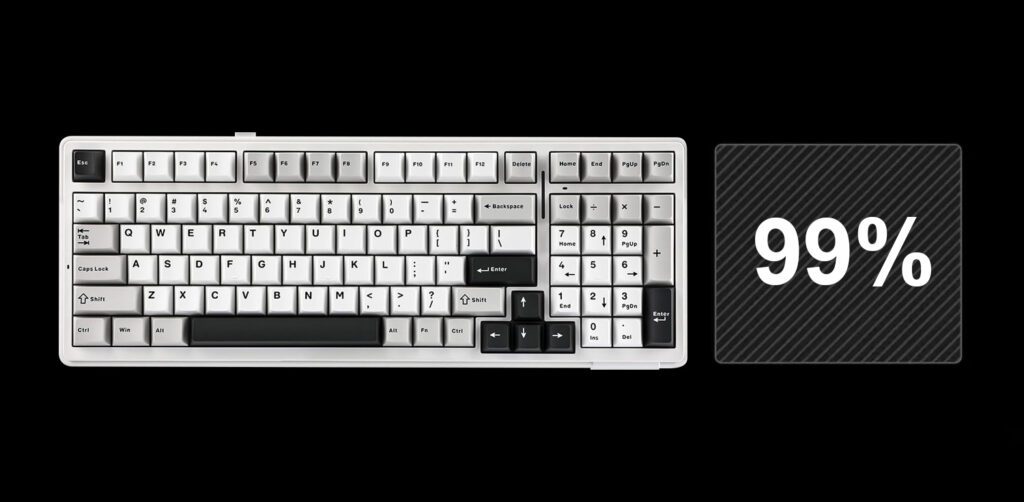
- 96% / 1800-콤팩트 거의 모든 기능을 유지하면서 키 클러스터 사이의 간격을 줄여 숫자 키패드를 그대로 사용하면서도 더 작은 크기를 확보했습니다.
96%의 가장 큰 단점은 칸막이 사이의 간격이 좁다는 점입니다. 칸막이 사이에 "여유 공간"이 적다는 것은 적응 기간이 짧다는 것을 의미하지만, 책상 공간을 절약할 수 있다는 장점이 있습니다.
최고 추천 상품: 아울라 F99
숫자 키패드가 필요한 분들을 위해, 96 기계식 키보드 ~처럼 아울라 F99 강력한 해결책입니다.
주요 특징 및 기능
- 모든 기능 사용 가능: 그만큼 아울라 f99 키보드 숫자 키패드를 유지하면서도 컴팩트한 거의 전체 키보드 레이아웃(99개 키)을 사용합니다.
- 심층 맞춤 설정: 매크로 드라이버 지원, 키 재매핑 및 전용 포트를 통한 RGB 사용자 지정 기능이 제공됩니다. aula f99 프로 소프트웨어.
- 핫스왑 가능: 5핀 핫스왑 소켓으로 간편한 스위치 교체 가능 (사용자 지정 가능) 아울라 f99 스위치 그리고 아울라 f99 키캡).
- 무선 활용성의 다재다능함: 블루투스 5.0 / 2.4G / USB-C의 세 가지 모드를 지원하여 생산성 보드와 다용도 보드로 모두 활용 가능합니다. 무선 게이밍 키보드.
- 키캡 및 키감: 이중 사출 PBT 키캡; 다중 소음 감쇠층이 있는 개스킷 구조.
호환성 및 최적 사용 대상
- 시스템: 윈도우/맥.
- 다음과 같은 경우에 가장 적합합니다: 데이터 입력, 금융업, 숫자 키패드를 매일 사용하는 모든 사람 - 하지만 풀사이즈 키보드보다 더 컴팩트한 책상 환경을 원하는 사람.
결론: 컴팩트 키보드 vs. 풀사이즈 키보드 - 나에게 맞는 키보드 레이아웃 선택 방법
좋은 팁: 평소에 생각 없이 사용하는 키들이 모두 포함된 가장 작은 키보드 레이아웃을 선택하세요.
- 60%를 선택하세요 마우스 사용 공간과 휴대성이 가장 중요하고, 레이어 기능을 배우는 데 문제가 없다면 이 방법이 적합합니다.
- 65%를 선택하세요 게임과 탐색을 위한 전용 화살표가 있는 컴팩트한 크기를 원하신다면.
- 75%를 선택하세요 화면을 넓게 펼치지 않고 F키를 다시 사용하고 싶다면.
- TKL(80%)을 선택하세요. 숫자 키패드 없이 클래식한 느낌과 내비게이션 계기판을 원하신다면.
- 96% 또는 100% 중에서 선택하세요. 스프레드시트와 숫자 키패드 워크플로가 필수 불가결한 경우.
책상 공간과 일상적인 사용 편의성의 균형을 맞춘 안전한 시작점을 원한다면, 아울라 F75 시작하기 쉬운 곳입니다.
 English
  German
  Portuguese
  Spanish
  Italian
  Finnish
  French
  Japanese
  Korean
  Swedish